Top 4 Moves When You Suspect Software is Inflating Inventory

We often are asked, “Why is the software driving up the inventory?” The answer is that Smart isn’t driving it in either direction – the inputs are driving it, and those inputs are controlled by the users (or admins). Here are four things you can do to get the results you expect.

1. Confirm that your service level targets are commensurate with what you want for that item or group of items. Setting very high targets (95% or more) will likely drive inventory up if you have been coasting along at a lower level and are OK with being there. It’s possible you’ve never achieved the new higher service level but customers have not complained.  Figure out what service level has worked by evaluating historical reports on performance and set your targets accordingly. But keep in mind that competitors may beat you on item availability if you keep using your father’s service level targets.

2. Make sure your understanding of “service level” aligns with the software system’s definition. You may be measuring performance based on how often you ship within one week from receipt of the customer order, whereas the software is targeting reorder points based on your ability to ship right away, not within a week. Clearly the latter will require more inventory to hit the same “service level.” For instance, a 75% same-day service level may correspond to a 90% same-week service level. In this case, you are really comparing apples to oranges. If this is the reason for the excess stock, then determine what “same day” service level is needed to get you to your desired “same week” service level and enter that into the software. Using the less-stringent same-day target will drop the inventory, sometimes very significantly.

3. Evaluate the lead time inputs. We’ve seen instances in which lead times had been inflated to trick old software into producing desired results. Modern software tracks suppliers’ performance by recording their actual lead times over multiple orders, then it takes account of lead time variability in its simulations of daily operations. Watch out if your lead times are fixed at one value that was decided on in the distant past and isn’t current.

4. Check your demand signal. You have lots of historical transactions in your ERP system that can be used in many ways to determine the demand history. If you are using signals such as transfers, or you are not excluding returns, then you may be overstating demand. Spend a little time on defining “demand” in the way that makes most sense for your situation.

Uncover data facts and improve inventory performance

The best inventory planning processes rely on statistical analysis to uncover relevant facts about the data. For instance:

  1. The range of demand values and supplier lead times to expect.
  2. The most likely values of item demand and supplier lead time.
  3. The full probability distributions of item demand and supplier lead time.

If you reach the third level, you have the facts required to answer important operational questions, additional questions such as:

  1. Exactly how much extra stock is needed to improve service levels by 5%?
  2. What will happen to on-time-delivery if inventory is reduced by 5%?
  3. Will either of the above changes generate a positive financial return?
  4. More generally, what service level target and associated inventory level is most profitable?

When you have the facts and add your business knowledge, you can make more informed stocking decisions that will generate significant returns. You’ll also set proper expectations with internal and external stakeholders, ensuring there are fewer unwelcome surprises.

Extend Epicor Prophet 21 with Smart IP&O’s Forecasting & Dynamic Reorder Point Planning

In this article, we will review the inventory ordering functionality in Epicor P21, explain its limitations, and summarize how Smart Inventory Planning & Optimization (Smart IP&O) can help reduce inventory, minimize stock-outs and restore your organization’s trust in your ERP by providing robust predictive analytics, consensus-based forecasting, and what-if scenario planning.

Replenishment Planning Features within Epicor Prophet 21
Epicor P21 can manage replenishment by suggesting what to order and when via reorder point-based or forecast-driven inventory policies.  Users may compute these policies externally or generate them dynamically within P21.  Once the policies and forecasts have been specified, P21’s Purchase Order Requirements Generator (PORG) will create automated order suggestions of what to replenish and when by reconciling incoming supply, current on hand, outgoing demand, stocking policies, and demand forecasts.

Epicor P21 has 4 Replenishment Methods
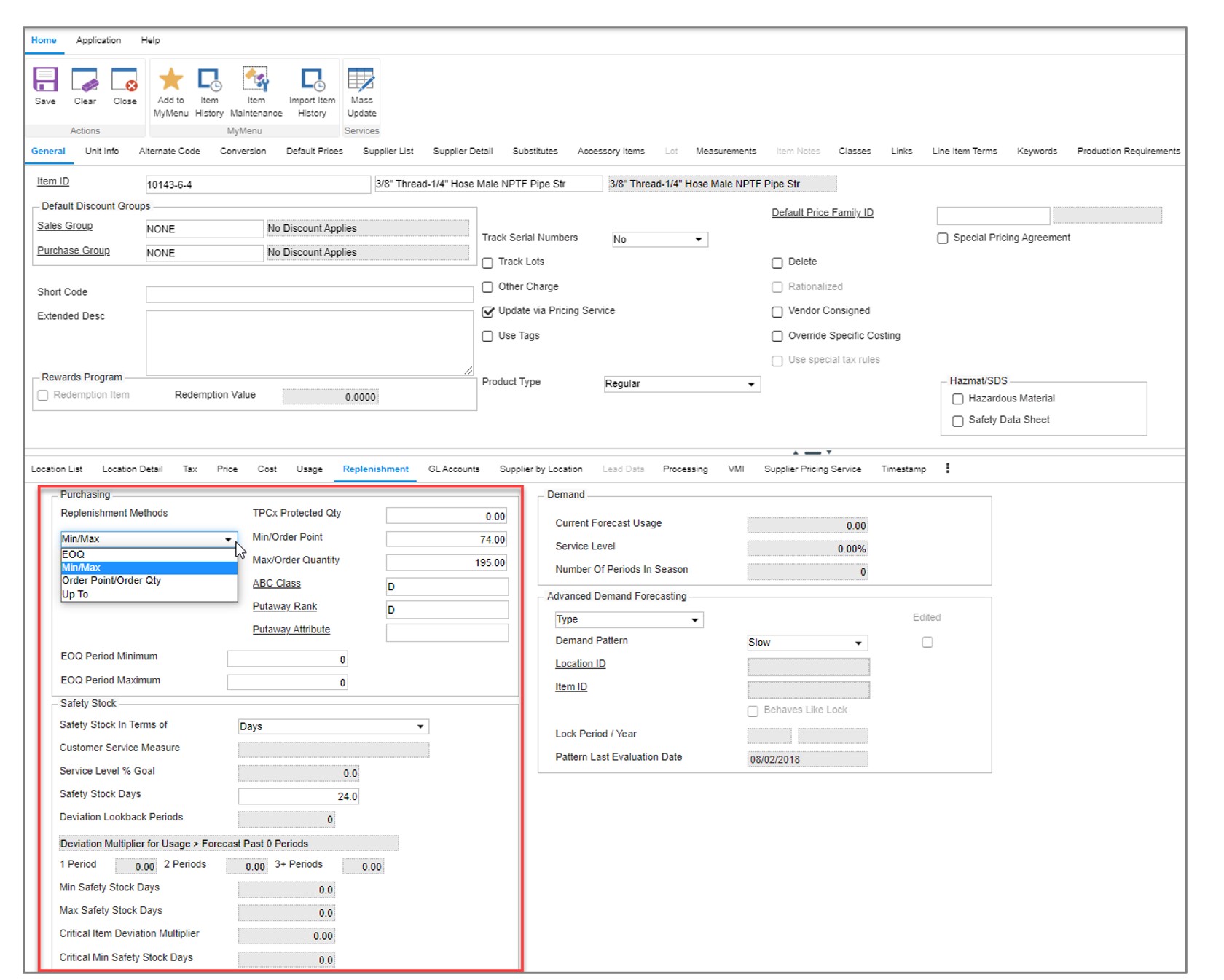
In the item maintenance screen of Epicor P21, users can choose from one of four replenishment methods for each stock item.

  1. Min/Max
  2. Order Point/Order Quantity
  3. EOQ
  4. Up To

There are additional settings and configurations for determining lead times and accounting for order modifiers such as supplier-imposed minimum and maximum order quantities.  Min/Max and Order Point/Order Quantity are considered “static” policies.  EOQ and Up To are considered “dynamic” policies and computed within P21.

Min/Max
The reorder point is equal to the Min.  Whenever on hand inventory drops below the Min (reorder point) the PORG report will create an order suggestion up to the Max (for example, if on hand after the breach is 20 units and the Max is 100 then the order quantity will be 80).  Min/Max is considered a static policy and once entered into P21 will remain unchanged unless overridden by the user.  Users often run spreadsheets to compute the Min/Max values and update them from time to time.

Order Point/Order Quantity
This is the same as the Min/Max policy except instead of ordering up to the Max, an order will be suggested for a fixed quantity defined by the user (for example, always order 100 units when the order point is breached). OP/OQ is considered a static policy and will remain unchanged unless overridden by the user.  Users often run spreadsheets to compute OP/OQ values and update them from time to time.

EOQ
The EOQ policy is a reorder point-based method.  The reorder point is dynamically generated based on P21’s forecast of demand over lead time + demand over the review period + safety stock.  The order quantity is based on an Economic Order Quantity calculation that considers holding costs and ordering costs and attempts to recommend an order size that minimizes total cost.  When on hand inventory breaches the reorder point, the PORG report will kick out an order equal to the computed EOQ.

Up To
The Up To method is another dynamic policy that relies on a reorder point.  It is computed the same way as the EOQ method using P21’s forecasted demand over the lead time + demand over review period + safety stock.   The order quantity suggestion is based on whatever is needed to replenish stock back “up to” the reorder point.  This tends to equate to an order quantity that is consistent with the lead time demand because as demand drives stock below the reorder point, orders will be suggested “up to” the reorder point.

Epicor Prophet 21 with Forecasting Inventory Planning P21

P21’s Item Maintenance Screen where users can specify the desired inventory policy and configure other settings such as safety stock and order modifiers.

Limitations

Forecast Methods
There are two forecast modes in P21:  Basic and Advanced.  Each use a series of averaging methods and require manual configurations and user determined classification rules to generate a demand forecast.  Neither mode is designed with an out-of-the-box expert system that automatically generates forecasts that account for underlying patterns such as trend or seasonality.  Lots of configuration is required that tends to inhibit user adoption and modification of the assumed forecasting rules defined in the initial implementation that may no longer be relevant.  There isn’t a way to easily compare the forecast accuracy of different configurations.  For example, is it better to use 24 months of history or 18 months?  Is it more accurate to assume a trend should be applied when an item grows by 2% per month or should it be 10%?  Is it better to assume the item is seasonal if 80% or more of it’s demand occurs in 6 months of the year or  4 months of the year? As a result, it is common for classification rules to be too broad or specific resulting in problems such as application of an incorrect forecasting model, using too much or too little history, or over/understating the trend and seasonality.   To learn more about how this works, check out this blog post (coming soon)

Forecast Management & Consensus Planning
P21 lacks forecast management features that enable organizations to plan at multiple hierarchy levels such as product family, region, or by customer.  Forecasts must be created at the lowest level of granularity (product by location) where demand is often too intermittent to get a good forecast.  There isn’t a way to share forecasts, collaborate, review, or create forecasts at aggregate levels, and agree on the consensus plan. It is difficult to incorporate business knowledge, assess forecasts at higher levels of aggregation, and track whether overrides are improving or hurting forecast accuracy. This makes forecasting too one-dimensional and dependent on the initial math configurations.  

Intermittent Demand
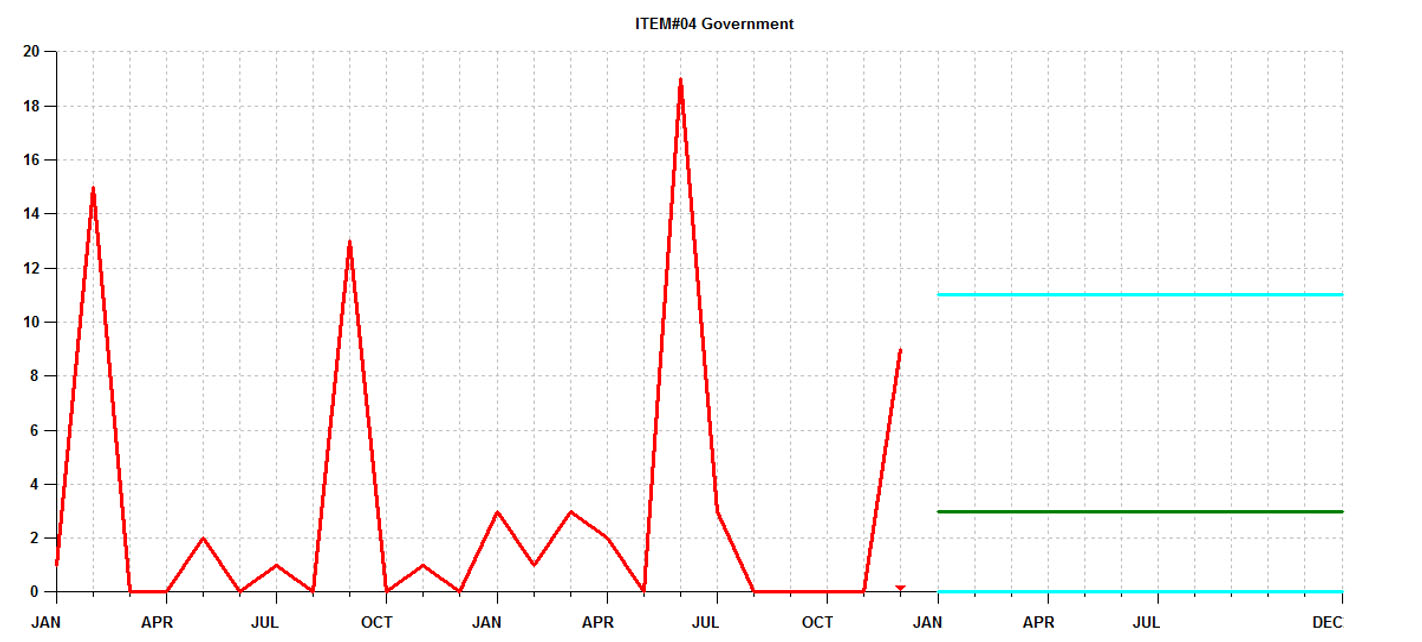
Many P21 customers rely on static methods (Min/Max and OP/OQ) because of the prevalence of intermittent demand.  Otherwise known as “lumpy”, intermittent demand is characterized by sporadic sales, large spikes in demand, and many periods with no demand at all. When demand is intermittent, traditional forecasting and safety stock methods just don’t work.  Since distributors don’t have the luxury of stocking only high movers with consistent demand, they need specialized solutions that are engineered to effectively plan intermittently demanded items. 80% or more of a distributor’s parts will have intermittent demand.  The stocking policies that are generated using traditional methods such as those available in P21 and other planning applications will result in incorrect estimates of what to stock to achieve the targeted service level.  As illustrated in the graph below, it isn’t possible to consistently forecast the spikes.  You are stuck with a forecast that is effectively an average of the prior periods.

Epicor Prophet 21 with Forecasting Inventory Management

Forecasts of intermittent demand can’t predict the spikes and require safety stock buffers to protect against stockouts.


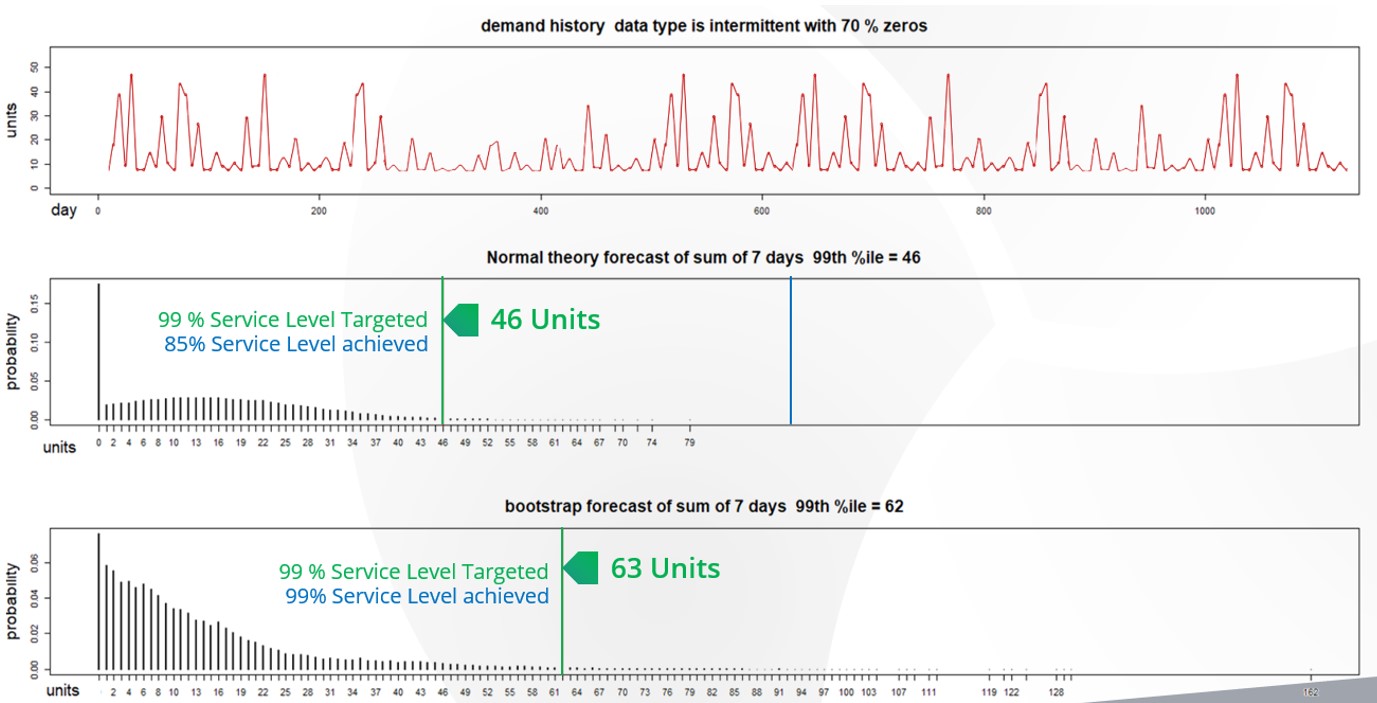
Second, P21’s safety stock methods allow you to set a target service level but the underlying logic mistakenly assumes that the demand is normally distributed.  With intermittent demand, the demand isn’t “normal” and therefore the estimate of safety stock will be wrong.   Here is what wrong means: when setting a service level of, for example 98%, the expectation is that 98% of the time the stock on hand will fill 100% of what the customer needs from the shelf.  Using a normal distribution to compute safety stocks will result in large deviations between the targeted service level and actual service level achieved.  It is not uncommon to see situations where the actual service level misses the target by 10% or more (i.e., targeted 95% but only achieved 85%).


Epicor Prophet 21 with Forecasting Inventory Analytics

In this figure you can see the demand history of an intermittently demanded part and two distributions based on this demand history. The first distribution was generated using the same “normal distribution: logic employed by P21. The second is a simulated distribution based on Smart Software’s probabilistic forecasting. The “normal” P21 distribution recommends that 46 units is needed to achieve the 99% service level but when compared to actuals far more inventory was needed. Smart accurately predicted that 63 units was required to achieve the service level.

This blog explains how you can test your system’s service level accuracy.

Reliance on Spreadsheets & Reactive Planning
P21 customers tell us that they rely heavily on the use of spreadsheets to manage stocking policies and forecasting.  Spreadsheets aren’t purpose-built for forecasting and inventory optimization. Users will often bake in user-defined rule of thumb methods that often do more harm than good.  Once calculated, users must input the information back into P21 via manual file imports or even manual entry.  The time consuming nature of the process leads companies to infrequently compute their inventory policies – Many months and on occasion years go by in between mass updates leading to a “set it and forget it” reactive approach, where the only time a buyer/planner reviews inventory policy is at the time of order.  When policies are reviewed after the order point is already breached, it is too late.  When the order point is deemed too high, manual interrogation is required to review history, calculate forecasts, assess buffer positions, and to recalibrate.  The sheer volume of orders means that buyers will just release orders rather than take the painstaking time to review everything, leading to significant excess stock.  If the reorder point is too low, it’s already too late.  An expedite is now required driving up costs and even then, you’ll still lose sales if the customer goes elsewhere.

Limited What If Planning
Since features for modifying reorder points and order quantities are baked into P21 it is not possible to make wholesale changes across groups of items and assess predicted outcomes before deciding to commit.  This forces users to adopt a “wait and see” process when it comes to modifying parameters. Planners will make a change and then monitor actuals until they are confident the change improved things.  Managing this at scale—many planners are dealing with tens of thousands of items—is extremely time consuming and the end result is infrequent recalibration of inventory policy. This also contributes to reactive planning whereby planners will only review settings after a problem has occurred.

Epicor is Smarter
Epicor has partnered with Smart Software and offers Smart IP&O as a cross platform add-on to Prophet 21 complete with a bidirectional API-based integration.  This enables Epicor customers to leverage built-for-purpose best of breed forecasting and inventory optimization applications.  With Epicor Smart IP&O you can generate forecasts that capture trend and seasonality without having to first apply manual configurations.  You will be able to automatically recalibrate policies every planning cycle using field proven, cutting-edge statistical and probabilistic models that were engineered to accurately plan for intermittent demand.   Safety stocks will accurately account for demand and supply variability, business conditions, and priorities.  You can leverage service level driven planning so you have just enough stock or turn on optimization methods that prescribe the most profitable stocking policies and service levels that consider the real cost of carrying inventory. You can build consensus demand forecasts that blend business knowledge with statistics, better assess customer and sales forecasts, and confidently upload forecasts and stocking policies to Epicor with a few mouse-clicks.

Smart IP&O customers routinely realize 7 figure annual returns from reduced expedites, increased sales, and less excess stock, all the while gaining a competitive edge by differentiating themselves on improved customer service. To see a recorded webinar hosted by the Epicor Users Group that profiles Smart’s Demand Planning and Inventory Optimization platform, please register here: https://smartcorp.com/epicor-smart-inventory-planning-optimization/


Extend Epicor Kinetic’s Forecasting & Min/Max Planning with Smart IP&O

Extend Epicor Kinetic’s Forecasting & Min/Max Planning with Smart IP&O  
Epicor Kinetic can manage replenishment by suggesting what to order and when via reorder point-based inventory policies. Users can either manually specify these reorder points or use a daily average of demand to dynamically compute the policies.  If the policies aren’t correct then the automatic order suggestions will be inaccurate, and in turn the organization will end up with excess inventory, unnecessary shortages, and a general mistrust of their software systems.  In this article, we will review the inventory ordering functionality in Epicor Kinetic, explain its limitations, and summarize how Smart Inventory Planning & Optimization (Smart IP&O) can help reduce inventory, minimize stockouts and restore your organization’s trust in your ERP by providing the robust predictive functionality that is missing from ERP systems.

Epicor Kinetic (and Epicor ERP 10) Replenishment Policies
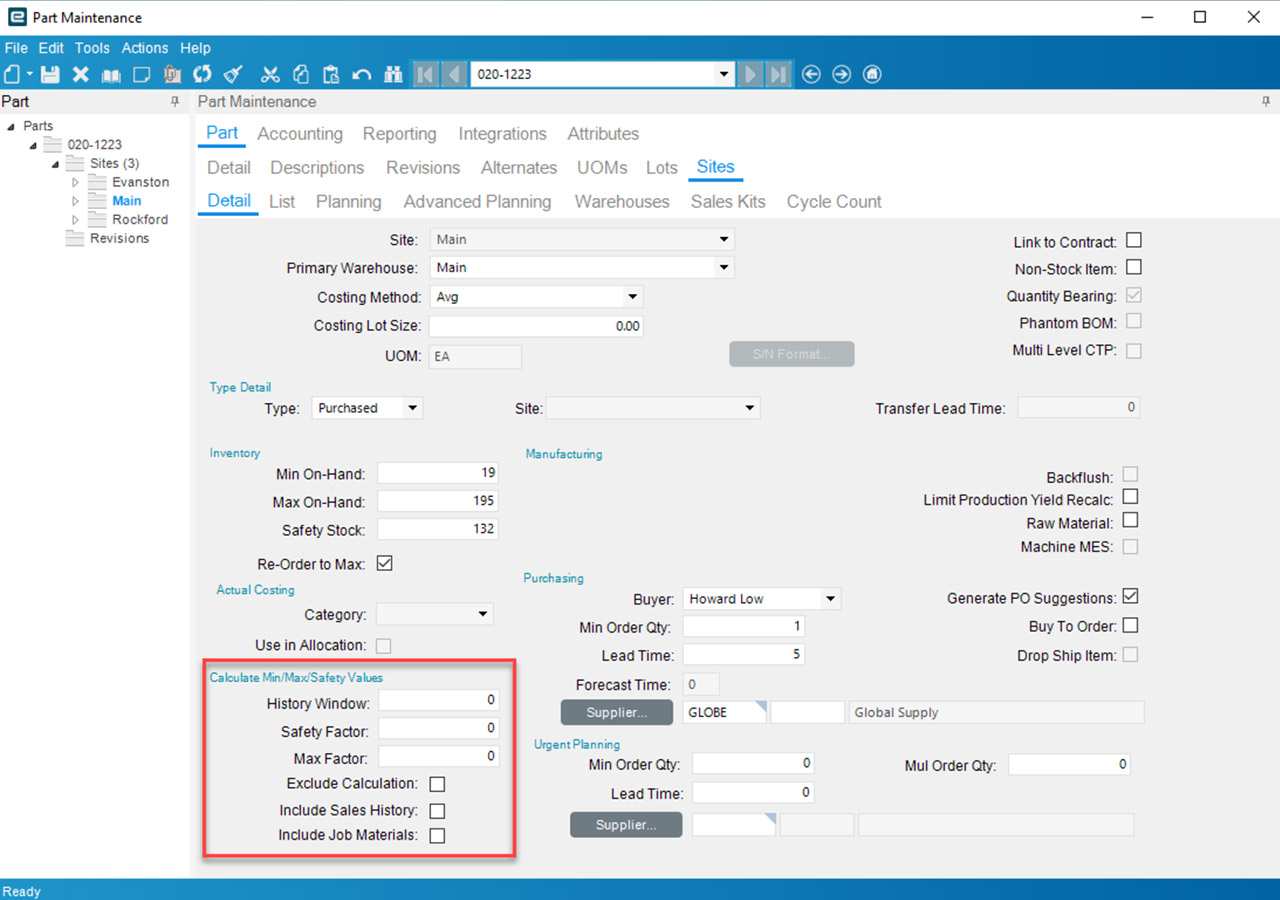
In the item maintenance screen of Epicor Kinetic, users can enter planning parameters for every stock item. These include Min On-Hand, Max On-Hand, Safety Stock lead times, and order modifiers such as supplier imposed minimum and maximum order quantities and order multiples.  Kinetic will reconcile incoming supply, current on hand, outgoing demand, stocking policies, and demand forecasts (that must be imported) to net out the supply plan.   Epicor’s time-phased replenishment inquiry details what is up for order and when while the Buyers Workbench enables users to assemble purchase orders.

Epicor’s Min/Max/Safety logic and forecasts that are entered into the “forecast entry” screen drives replenishment.  Here is how it works:

  • The reorder point is equal to Min + Safety. This means whenever on hand inventory drops below the reorder point an order suggestion will be created. If demand forecasts are imported via Epicor’s “forecast entry” screen the reorder point will account for the forecasted demand over the lead time and is equal to Min + Safety + Lead time forecast
  • If “reorder to Max” is selected, Epicor will generate an order quantity up to the Max. If not selected, Epicor will order the “Min Order Qty” if MOQ is less than the forecasted quantity over the time fence. Otherwise, it will order the forecasted demand over the time-period specified.  In the buyer’s workbench, the buyer can modify the actual order quantity if desired.


Limitations
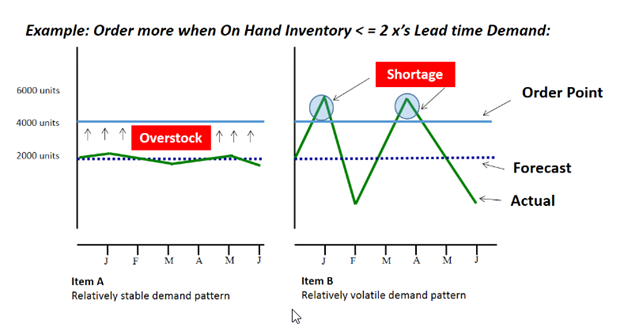
Epicor’s Min/Max/Safety relies on an average of daily demand. It is easy to set up and understand.  It can also be effective when you don’t have lots of demand history. However, you’ll have to create forecasts and adjust for seasonality, trend, and other patterns externally.  Finally, multiples of averages also ignore the important role of demand or supply variability and this can result in misallocated stock as illustrated in the graphic below: 


Epicor same average demand and safety stock is determined

In this example, two equally important items have the same average demand (2,000 per month) and safety stock is determined by doubling the lead time demand resulting in a reorder point of 4,000. Because the multiple ignores the role of demand variability, Item A results in a significant overstock and Item B results in significant stockouts.

As designed, Min should hold expected demand over lead time and Safety should hold a buffer. However, these fields are often used very differently across items without a uniform policy; sometimes users even enter a Min and Safety Stock even though the item is being forecasted, effectively over estimating demand! This will generate order suggestions before it is needed, resulting in overstocks.  

Spreadsheet Planning
Many companies turn to spreadsheets when they face challenges setting policies in their ERP system.  These spreadsheets often rely on user defined rule of thumb methods that often do more harm than good.  Once calculated, they must input the information back into Epicor,  via manual file imports or even manual entry.  The time consuming nature of the process leads companies to infrequently compute their inventory policies – Many months of even years go by in between mass updates leading to a “set it and forget it” reactive approach, where the only time a buyer/planner reviews inventory policy is at the time of order.  When policies are reviewed after the order point is already breached it is too late.  When the order point is deemed too high, manual interrogation is required to review history, calculate forecasts, assess buffer positions, and to recalibrate.  The sheer volume of orders means that buyers will just release orders rather than take the painstaking time to review everything leading to significant excess stock.  If the reorder point is too low, it’s already too late.  An expedite is now required driving up costs and even then you’ll still lose sales if the customer goes elsewhere.

Epicor is Smarter
Epicor has partnered with Smart Software and offers Smart IP&O as a cross platform add-on to Epicor Kinetic and Prophet 21 with API based integrations.  This enables Epicor customers to leverage built for purpose best of breed forecasting and inventory optimization applications.  With Epicor Smart IP&O you can automatically recalibrate policies every planning cycle using field proven, cutting-edge statistical and probabilistic models.  You can calculate demand forecasts that account for seasonality, trend, and cyclical patterns.  Safety stocks will account for demand and supply variability, business conditions, and priorities.  You can leverage service level driven planning so you have just enough stock or turn on optimization methods that prescribe the most profitable stocking policies and service levels that consider the real cost of carrying inventory. You can build consensus demand forecasts that blend business knowledge with statistics, better assess customer and sales forecasts, and confidently upload forecasts and stocking policies to Epicor within a few mouse-clicks.

Smart IP&O customers routinely realize 7 figure annual returns from reduced expedites, increased sales, and less excess stock, all the while gaining a competitive edge by differentiating themselves on improved customer service. To see a recorded webinar hosted by the Epicor Users Group that profiles Smart’s Demand Planning and Inventory Optimization platform, please register here: https://smartcorp.com/epicor-smart-inventory-planning-optimization/


A Beginner’s Guide to Downtime and What to Do about It

This blog provides an overview of this topic written for non-experts. It

  • explains why you might want to read this blog.
  • lists the various types of “machine maintenance.”
  • explains what “probabilistic modeling” is.
  • describes models for predicting downtime.
  • explains what these models can do for you.

Importance of Downtime

If you manufacture things for sale, you need machines to make those things. If your machines are up and running, you have a fighting chance to make money. If your machines are down, you lose opportunities to make money. Since downtime is so fundamental, it is worth some investment of money and thought to minimize downtime. By thought I mean probability math, since machine downtime is inherently a random phenomenon. Probability models can guide maintenance policies.

Machine Maintenance Policies

Maintenance is your defense against downtime. There are multiple types of maintenance policies, ranging from “Do nothing and wait for failure” to sophisticated analytic approaches involving sensors and probability models of failure.

A useful list of maintenance policies is:

  • Sitting back and wait for trouble, then sitting around some more wondering what to do when trouble inevitably happens. This is as foolish as it sounds.
  • Same as above except you prepare for the failure to minimize downtime, e.g., stockpiling spare parts.
  • Periodically checking for impending trouble coupled with interventions such as lubricating moving parts or replacing worn parts.
  • Basing the timing of maintenance on data about machine condition rather than relying on a fixed schedule; requires ongoing data collection and analysis. This is called condition-based maintenance.
  • Using data on machine condition more aggressively by converting it into predictions of failure time and suggestions for steps to take to delay failure. This is called predictive maintenance.

The last three types of maintenance rely on probability math to establish a maintenance schedule, or determine when data on machine condition call for intervention, or calculate when failure might occur and how best to postpone it.


Probability Models of Machine Failure

How long a machine will run before it fails is a random variable. So is the time it will spend down. Probability theory is the part of math that deals with random variables. Random variables are described by their probability distributions, e.g., what is the chance that the machine will run for 100 hours before it goes down? 200 hours? Or, equivalently, what is the chance that the machine is still working after 100 hours or 200 hours?

A sub-field called “reliability theory” answers this type of question and addresses related concepts like Mean Time Before Failure (MTBF), which is a shorthand summary of the information encoded in the probability distribution of time before failure.

Figures 1 shows data on the time before failure of air conditioning units. This type of plot depicts the cumulative probability distribution and shows the chance that a unit will have failed after some amount of time has elapsed. Figure 2 shows a reliability function, plotting the same type of information in an inverse format, i.e., depicting the chance that a unit is still functioning after some amount of time has elapsed.

In Figure 1, the blue tick marks next to the x-axis show the times at which individual air conditioners were observed to fail; this is the basic data. The black curve shows the cumulative proportion of units failed over time. The red curve is a mathematical approximation to the black curve – in this case an exponential distribution. The plots show that about 80 percent of the units will fail before 100 hours of operation.
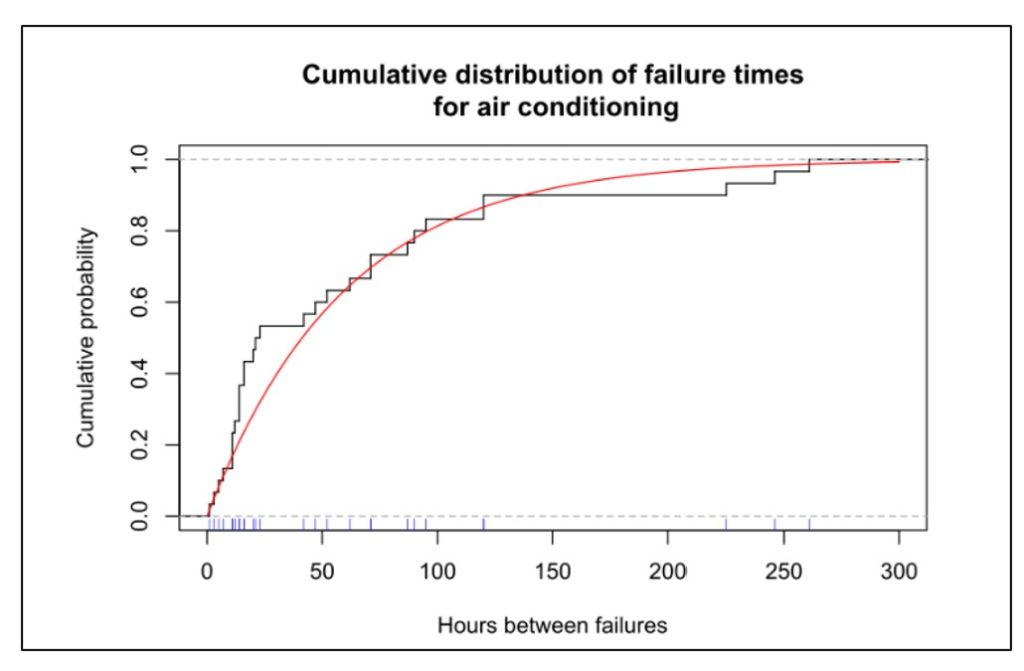
Figure 1 Cumulative distribution function of uptime for air conditioners

Figure 1 Cumulative distribution function of uptime for air conditioners


Probability models can be applied to an individual part or component or subsystem, to a collection of related parts (e.g., “the hydraulic system”), or to an entire machine. Any of these can be described by the probability distribution of the time before they fail.

Figure 2 shows the reliability function of six subsystems in a machine for digging tunnels. The plot shows that the most reliable subsystem is the cutting arms and the least reliable is the water subsystem. The reliability of the entire system could be approximated by multiplying all six curves (because for the system as a whole to work, every subsystem must be functioning), which would result in a very short interval before something goes wrong.
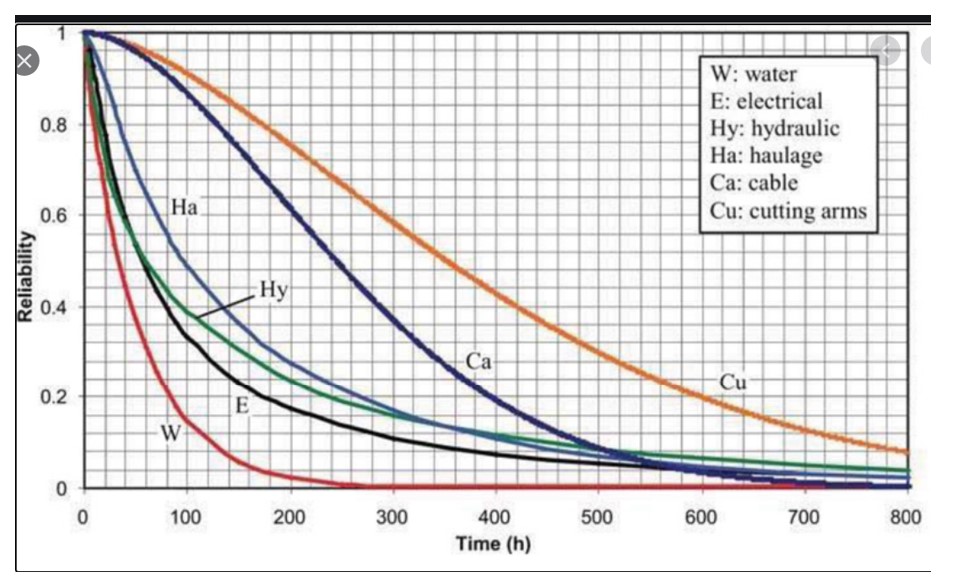
Figure 2 Examples of probability distributions of subsystems in a tunneling machine

Figure 2 Examples of probability distributions of subsystems in a tunneling machine


Various factors influence the distribution of the time before failure. Investing in better parts will prolong system life. So will investing in redundancy. So will replacing used pars with new.

Once a probability distribution is available, it can be used to answer any number of what-if questions, as illustrated below in the section on Benefits of Models.


Approaches to Modeling Machine Reliability

Probability models can describe either the most basic units, such as individual system components (Figure 2), or collections of basic units, such as entire machines (Figure 1). In fact, an entire machine can be modeled either as a single unit or as a collection of components. If treating an entire machine as a single unit, the probability distribution of lifetime represents a summary of the combined effect of the lifetime distributions of each component.

If we have a model of an entire machine, we can jump to models of collections of machines. If instead we start with models of the lifetimes of individual components, then we must somehow combine those individual models into an overall model of the entire machine.

This is where the math can get hairy. Modeling always requires a wise balance between simplification, so that some results are possible, and complication, so that whatever results emerge are realistic. The usual trick is to assume that failures of the individual pieces of the system occur independently.

If we can assume failures occur independently, it is usually possible to model collections of machines. For instance, suppose a production line has four machines churning out the same product. Having a reliability model for a single machine (as in Figure 1) lets us predict, for instance, the chance that only three of the machines will still be working one week from now. Even here there can be a complication: the chance that a machine working today will still be working tomorrow often depends on how long it has been since its last failure. If the time between failures has an exponential distribution like the one in Figure 1, then it turns out that the time of the next failure doesn’t depend on how long it has been since the last failure. Unfortunately, many or even most systems do not have exponential distributions of uptime, so the complication remains.

Even worse, if we start with models of many individual component reliabilities, working our way up to predicting failure times for the entire complex machine may be nearly impossible if we try to work with all the relevant equations directly. In such cases, the only practical way to get results is to use another style of modeling: Monte Carlo simulation.

Monte Carlo simulation is a way to substitute computation for analysis when it is possible to create random scenarios of system operation. Using simulation to extrapolate machine reliability from component reliabilities works as follows.

  1. Start with the cumulative distribution functions (Figure 1) or reliability functions (Figure 2) of each machine component.
  2. Create a random sample from each component lifetime to get a set of sample failure times consistent with its reliability function.
  3. Using the logic of how components are related to one another, compute the failure time of the entire machine.
  4. Repeat steps 1-3 many times to see the full range of possible machine lifetimes.
  5. Optionally, average the results of step 4 to summarize the machine lifetime with such metrics such as the MTBF or the chance that the machine will run more than 500 hours before failing.

Step 1 would be a bit complicated if we do not have a nice probability model for a component lifetime, e.g., something like the red line in Figure 1.

Step 2 can require some careful bookkeeping. As time moves forward in the simulation, some components will fail and be replaced while others will keep grinding on. Unless a component’s lifetime has an exponential distribution, its remaining lifetime will depend on how long the component has been in continual use. So this step must account for the phenomena of burn in or wear out.

Step 3 is different from the others in that it does require some background math, though of a simple type. If Machine A only works when both components 1 and 2 are working, then (assuming failure of one component does not influence failure of the other)

Probability [A works] = Probability [1 works] x Probability [2 works].

If instead Machine A works if either component 1 works or component 2 works or both work, then

Probability [A fails] = Probability [1 fails] x Probability [2 fails]

so Probability [A works] = 1 – Probability [A fails].

Step 4 can involve creation of thousands of scenarios to show the full range of random outcomes. Computation is fast and cheap.

Step 5 can vary depending on the user’s goals. Computing the MTBF is standard. Choose others to suit the problem. Besides the summary statistics provided by step 5, individual simulation runs can be plotted to build intuition about the random dynamics of machine uptime and downtime. Figure 3 shows an example for a single machine showing alternating cycles of uptime and downtime resulting in 85% uptime.
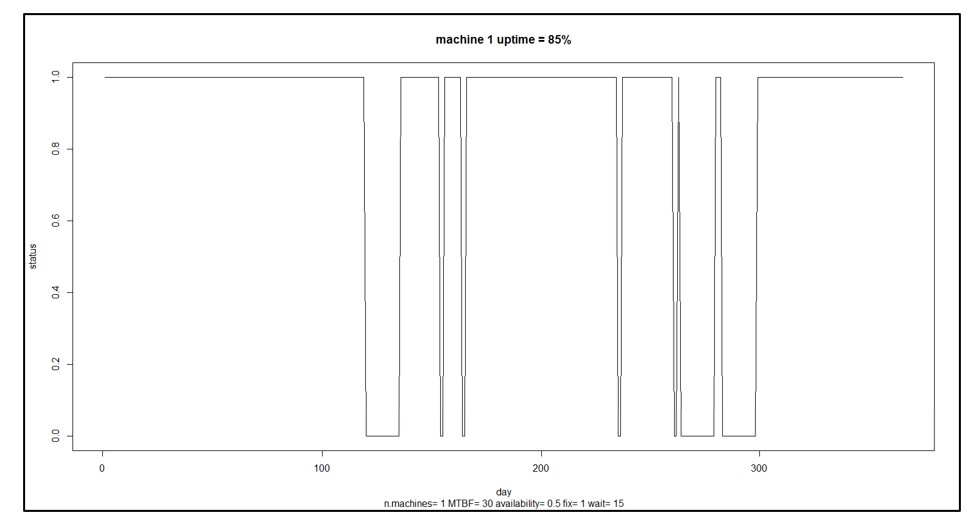
Figure 3 A sample scenario for a single machine

Figure 3 A sample scenario for a single machine


Benefits of Machine Reliability Models

In Figure 3, the machine is up and running 85% of the time. That may not be good enough. You may have some ideas about how to improve the machine’s reliability, e.g., maybe you can improve the reliability of component 3 by buying a newer, better version from a different supplier. How much would that help? That is hard to guess: component 3 may only one of several and perhaps not the weakest link, and how much the change pays off depends on how much better the new one would be. Maybe you should develop a specification for component 3 that you can then shop to potential suppliers, but how long does component 3 have to last to have a material impact on the machine’s MTBF?

This is where having a model pays off. Without a model, you’re relying on guesswork. With a model, you can turn speculation about what-if situations into accurate estimates. For instance, you could analyze how a 10% increase in MTBF for component 3 would translate into an improvement in MTBF for the entire machine.

As another example, suppose you have seven machines producing an important product. You calculate that you must dedicate six of the seven to fill a major order from your one big customer, leaving one machine to handle demand from a number of miscellaneous small customers and to serve as a spare. A reliability model for each machine could be used to estimate the probabilities of various contingencies: all seven machines work and life is good; six machines work so you can at least keep your key customer happy; only five machines work so you have to negotiate something with your key customer, etc.

In sum, probability models of machine or component failure can provide the basis for converting failure time data into smart business decisions.


Read more about  Maximize Machine Uptime with Probabilistic Modeling


Read more about   Probabilistic forecasting for intermittent demand



Leave a Comment
Related Posts
The Importance of Clear Service Level Definitions in Inventory Management

The Importance of Clear Service Level Definitions in Inventory Management

Inventory optimization software that supports what-if analysis will expose the tradeoff of stockouts vs. excess costs of varying service level targets. But first it is important to identify how “service levels” is interpreted, measured, and reported. This will avoid miscommunication and the false sense of security that can develop when less stringent definitions are used. Clearly defining how service level is calculated puts all stakeholders on the same page. This facilitates better decision-making.

The Cost of Spreadsheet Planning

The Cost of Spreadsheet Planning

Companies that depend on spreadsheets for demand planning, forecasting, and inventory management are often constrained by the spreadsheet’s inherent limitations. This post examines the drawbacks of traditional inventory management approaches caused by spreadsheets and their associated costs, contrasting these with the significant benefits gained from embracing state-of-the-art planning technologies.

Leveraging Epicor Kinetic Planning BOMs with Smart IP&O to Forecast Accurately

Leveraging Epicor Kinetic Planning BOMs with Smart IP&O to Forecast Accurately

In this blog, we explore how leveraging Epicor Kinetic Planning BOMs with Smart IP&O can transform your approach to forecasting in a highly configurable manufacturing environment. Discover how Smart, a cutting-edge AI-driven demand planning and inventory optimization solution, can simplify the complexities of predicting finished goods demand, especially when dealing with interchangeable components. Learn how Planning BOMs and advanced forecasting techniques enable businesses to anticipate customer needs more accurately, ensuring operational efficiency and staying ahead in a competitive market.