
Extend Epicor Prophet 21 with Smart IP&O’s Forecasting & Dynamic Reorder Point Planning

In this article, we will review the inventory ordering functionality in Epicor P21, explain its limitations, and summarize how Smart Inventory Planning & Optimization (Smart IP&O) can help reduce inventory, minimize stock-outs and restore your organization’s trust in your ERP by providing robust predictive analytics, consensus-based forecasting, and what-if scenario planning.

Replenishment Planning Features within Epicor Prophet 21
Epicor P21 can manage replenishment by suggesting what to order and when via reorder point-based or forecast-driven inventory policies.  Users may compute these policies externally or generate them dynamically within P21.  Once the policies and forecasts have been specified, P21’s Purchase Order Requirements Generator (PORG) will create automated order suggestions of what to replenish and when by reconciling incoming supply, current on hand, outgoing demand, stocking policies, and demand forecasts.

Epicor P21 has 4 Replenishment Methods
In the item maintenance screen of Epicor P21, users can choose from one of four replenishment methods for each stock item.

  1. Min/Max
  2. Order Point/Order Quantity
  3. EOQ
  4. Up To

There are additional settings and configurations for determining lead times and accounting for order modifiers such as supplier-imposed minimum and maximum order quantities.  Min/Max and Order Point/Order Quantity are considered “static” policies.  EOQ and Up To are considered “dynamic” policies and computed within P21.

Min/Max
The reorder point is equal to the Min.  Whenever on hand inventory drops below the Min (reorder point) the PORG report will create an order suggestion up to the Max (for example, if on hand after the breach is 20 units and the Max is 100 then the order quantity will be 80).  Min/Max is considered a static policy and once entered into P21 will remain unchanged unless overridden by the user.  Users often run spreadsheets to compute the Min/Max values and update them from time to time.

Order Point/Order Quantity
This is the same as the Min/Max policy except instead of ordering up to the Max, an order will be suggested for a fixed quantity defined by the user (for example, always order 100 units when the order point is breached). OP/OQ is considered a static policy and will remain unchanged unless overridden by the user.  Users often run spreadsheets to compute OP/OQ values and update them from time to time.

EOQ
The EOQ policy is a reorder point-based method.  The reorder point is dynamically generated based on P21’s forecast of demand over lead time + demand over the review period + safety stock.  The order quantity is based on an Economic Order Quantity calculation that considers holding costs and ordering costs and attempts to recommend an order size that minimizes total cost.  When on hand inventory breaches the reorder point, the PORG report will kick out an order equal to the computed EOQ.

Up To
The Up To method is another dynamic policy that relies on a reorder point.  It is computed the same way as the EOQ method using P21’s forecasted demand over the lead time + demand over review period + safety stock.   The order quantity suggestion is based on whatever is needed to replenish stock back “up to” the reorder point.  This tends to equate to an order quantity that is consistent with the lead time demand because as demand drives stock below the reorder point, orders will be suggested “up to” the reorder point.
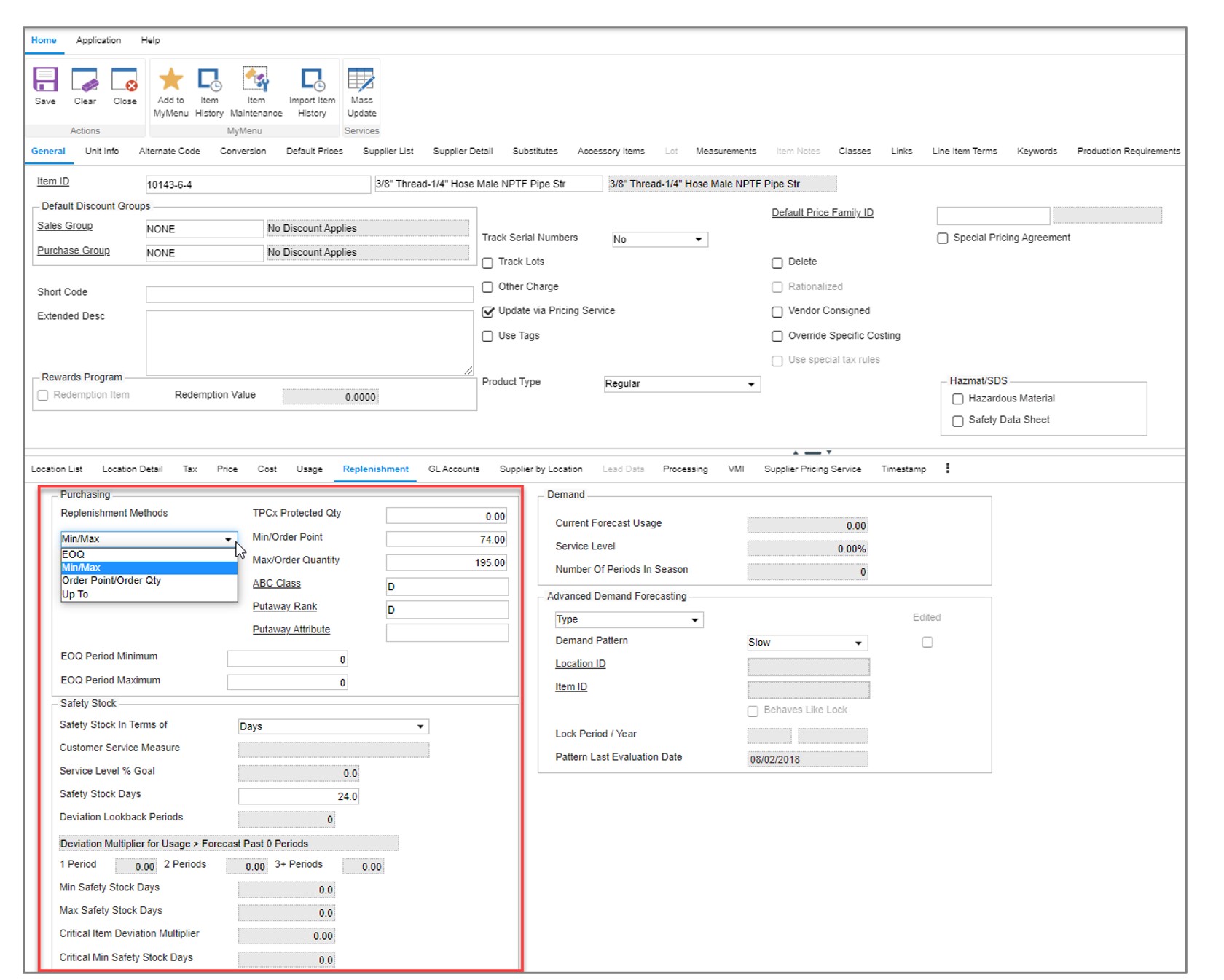
Epicor Prophet 21 with Forecasting Inventory Planning P21

P21’s Item Maintenance Screen where users can specify the desired inventory policy and configure other settings such as safety stock and order modifiers.

Limitations

Forecast Methods
There are two forecast modes in P21:  Basic and Advanced.  Each use a series of averaging methods and require manual configurations and user determined classification rules to generate a demand forecast.  Neither mode is designed with an out-of-the-box expert system that automatically generates forecasts that account for underlying patterns such as trend or seasonality.  Lots of configuration is required that tends to inhibit user adoption and modification of the assumed forecasting rules defined in the initial implementation that may no longer be relevant.  There isn’t a way to easily compare the forecast accuracy of different configurations.  For example, is it better to use 24 months of history or 18 months?  Is it more accurate to assume a trend should be applied when an item grows by 2% per month or should it be 10%?  Is it better to assume the item is seasonal if 80% or more of it’s demand occurs in 6 months of the year or  4 months of the year? As a result, it is common for classification rules to be too broad or specific resulting in problems such as application of an incorrect forecasting model, using too much or too little history, or over/understating the trend and seasonality.   To learn more about how this works, check out this blog post (coming soon)

Forecast Management & Consensus Planning
P21 lacks forecast management features that enable organizations to plan at multiple hierarchy levels such as product family, region, or by customer.  Forecasts must be created at the lowest level of granularity (product by location) where demand is often too intermittent to get a good forecast.  There isn’t a way to share forecasts, collaborate, review, or create forecasts at aggregate levels, and agree on the consensus plan. It is difficult to incorporate business knowledge, assess forecasts at higher levels of aggregation, and track whether overrides are improving or hurting forecast accuracy. This makes forecasting too one-dimensional and dependent on the initial math configurations.  

Intermittent Demand
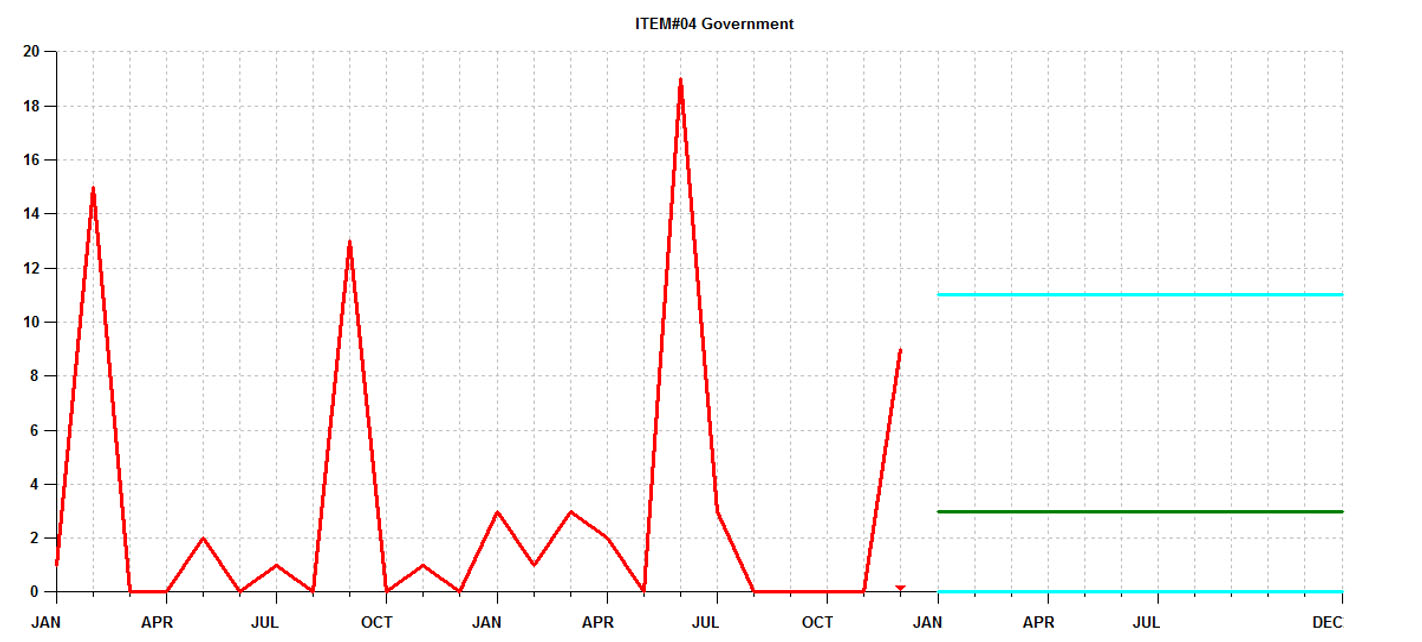
Many P21 customers rely on static methods (Min/Max and OP/OQ) because of the prevalence of intermittent demand.  Otherwise known as “lumpy”, intermittent demand is characterized by sporadic sales, large spikes in demand, and many periods with no demand at all. When demand is intermittent, traditional forecasting and safety stock methods just don’t work.  Since distributors don’t have the luxury of stocking only high movers with consistent demand, they need specialized solutions that are engineered to effectively plan intermittently demanded items. 80% or more of a distributor’s parts will have intermittent demand.  The stocking policies that are generated using traditional methods such as those available in P21 and other planning applications will result in incorrect estimates of what to stock to achieve the targeted service level.  As illustrated in the graph below, it isn’t possible to consistently forecast the spikes.  You are stuck with a forecast that is effectively an average of the prior periods.
Epicor Prophet 21 with Forecasting Inventory Management

Forecasts of intermittent demand can’t predict the spikes and require safety stock buffers to protect against stockouts.


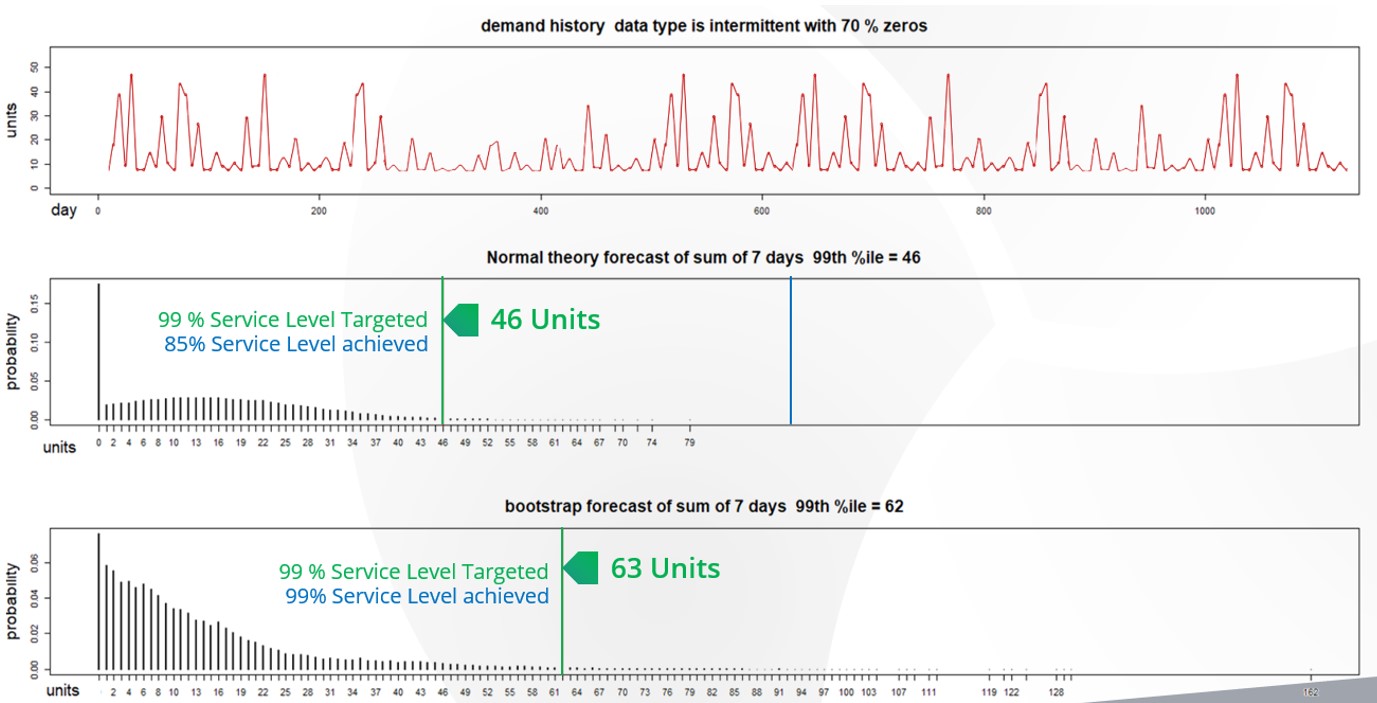
Second, P21’s safety stock methods allow you to set a target service level but the underlying logic mistakenly assumes that the demand is normally distributed.  With intermittent demand, the demand isn’t “normal” and therefore the estimate of safety stock will be wrong.   Here is what wrong means: when setting a service level of, for example 98%, the expectation is that 98% of the time the stock on hand will fill 100% of what the customer needs from the shelf.  Using a normal distribution to compute safety stocks will result in large deviations between the targeted service level and actual service level achieved.  It is not uncommon to see situations where the actual service level misses the target by 10% or more (i.e., targeted 95% but only achieved 85%).
 

Epicor Prophet 21 with Forecasting Inventory Analytics

In this figure you can see the demand history of an intermittently demanded part and two distributions based on this demand history. The first distribution was generated using the same “normal distribution: logic employed by P21. The second is a simulated distribution based on Smart Software’s probabilistic forecasting. The “normal” P21 distribution recommends that 46 units is needed to achieve the 99% service level but when compared to actuals far more inventory was needed. Smart accurately predicted that 63 units was required to achieve the service level.

This blog explains how you can test your system’s service level accuracy.

Reliance on Spreadsheets & Reactive Planning
P21 customers tell us that they rely heavily on the use of spreadsheets to manage stocking policies and forecasting.  Spreadsheets aren’t purpose-built for forecasting and inventory optimization. Users will often bake in user-defined rule of thumb methods that often do more harm than good.  Once calculated, users must input the information back into P21 via manual file imports or even manual entry.  The time consuming nature of the process leads companies to infrequently compute their inventory policies – Many months and on occasion years go by in between mass updates leading to a “set it and forget it” reactive approach, where the only time a buyer/planner reviews inventory policy is at the time of order.  When policies are reviewed after the order point is already breached, it is too late.  When the order point is deemed too high, manual interrogation is required to review history, calculate forecasts, assess buffer positions, and to recalibrate.  The sheer volume of orders means that buyers will just release orders rather than take the painstaking time to review everything, leading to significant excess stock.  If the reorder point is too low, it’s already too late.  An expedite is now required driving up costs and even then, you’ll still lose sales if the customer goes elsewhere.

Limited What If Planning
Since features for modifying reorder points and order quantities are baked into P21 it is not possible to make wholesale changes across groups of items and assess predicted outcomes before deciding to commit.  This forces users to adopt a “wait and see” process when it comes to modifying parameters. Planners will make a change and then monitor actuals until they are confident the change improved things.  Managing this at scale—many planners are dealing with tens of thousands of items—is extremely time consuming and the end result is infrequent recalibration of inventory policy. This also contributes to reactive planning whereby planners will only review settings after a problem has occurred.

Epicor is Smarter
Epicor has partnered with Smart Software and offers Smart IP&O as a cross platform add-on to Prophet 21 complete with a bidirectional API-based integration.  This enables Epicor customers to leverage built-for-purpose best of breed forecasting and inventory optimization applications.  With Epicor Smart IP&O you can generate forecasts that capture trend and seasonality without having to first apply manual configurations.  You will be able to automatically recalibrate policies every planning cycle using field proven, cutting-edge statistical and probabilistic models that were engineered to accurately plan for intermittent demand.   Safety stocks will accurately account for demand and supply variability, business conditions, and priorities.  You can leverage service level driven planning so you have just enough stock or turn on optimization methods that prescribe the most profitable stocking policies and service levels that consider the real cost of carrying inventory. You can build consensus demand forecasts that blend business knowledge with statistics, better assess customer and sales forecasts, and confidently upload forecasts and stocking policies to Epicor with a few mouse-clicks.

Smart IP&O customers routinely realize 7 figure annual returns from reduced expedites, increased sales, and less excess stock, all the while gaining a competitive edge by differentiating themselves on improved customer service. To see a recorded webinar hosted by the Epicor Users Group that profiles Smart’s Demand Planning and Inventory Optimization platform, please register here: https://smartcorp.com/epicor-smart-inventory-planning-optimization/


Scenario-based Forecasting vs. Equations

Why Scenario-based planning helps planners better manage risk and create better outcomes.

If you are reading this, you are probably a supply chain professional with responsibilities for demand forecasting, inventory management or both. If you live in the 21st century, you use software of some kind to help you do your job. But what, fundamentally, does your software do for you?

Traditionally, software has served as a delivery vehicle for equations. Even if you decided early on in life that you and equations don’t get along, they can still do something for you, and you can live with them—provided some software keeps all that math at a safe distance away.

This is fine, as far as it goes. But we at Smart Software think you would do better by trading in your equations for scenarios. Most often, the point of an equation is to give “the answer”, typically in the form of a number, as in “next month’s demand for SKUxxx will be 105 units.” Results like these are helpful, but incomplete.

Forecasting can be thought of as a computing problem, but it is more helpful to think of it as an exercise in risk management. The equation’s forecast of 105 units does not include any indication of the uncertainty in the forecast, though there is always some. It does not help you think about plausible contingencies: what if demand is for more than 105 units? What if it’s for fewer than 105? Could it get as high as 130 or as low as 80? Is 80 even remotely likely?

This is where scenario-based analysis shows its advantage. One definition of “scenario” is “a postulated sequence of events.” Our definition is more extensive: a scenario is “a postulated sequence of events and their associated probabilities of happening.” Scenarios are the ultimate what-if planning tool. Forecasting by equation will predict a demand for 105 units. Scenario forecasting produces a bundle of possible demand figures, some more likely and others less so. If there are few or no scenarios as low as 80, you can let that contingency go.

Plus-or-Minus How Much?

Those who are better versed in equation-based forecasting might protest that equation-based software sometimes provides indications of the “plus or minus” of a forecast, complete with a bell-shaped curve indicating the relative likelihood of various contingencies. However, when you see a perfect bell-shaped distribution, you know you are being asked to rely on a theoretical assumption that is only sometimes valid.

Scenario forecasts do not rely on that assumption.  In fact, they need not rely on any pre-conceived mathematical assumption whose main selling point is that it simplifies analysis. You don’t need a simplified analysis–you need a realistic analysis based on facts.

Cutting-edge software produces scenario forecasts, not just for demand planning but also for inventory management. Demand is a key input to inventory software, along with supplier behavior as reflected in replenishment lead times. Both demand and supply need to be forecasted if you want to see the consequences of, for instance, choosing a reorder point of 15 and an order quantity of 25.

Inventory systems are what is called “path sensitive”, meaning that any particular sequence of demand values will yield different performance than the same demand values in a different order. For example, if all your highest demand periods come bunched up, one after another, you’ll have much more difficulty keeping stocked than if the same high demand periods are spaced apart with time to restock in between. Scenarios reflect these differences in sufficient detail to yield average performance metrics reflective of the various contingencies inherent in uncertain demand.

Figure 1 illustrates the difference between an equation-based forecast and forecast scenarios.  The green cells hold 10 months of demand for a spare part. The blue cells hold an equation-based forecast that calls for average demand of 1.5 units in months 11, 12 and 13. The pistachio-colored cells hold eight scenario forecasts, though in practice our software would generate tens of thousands of scenarios. Now, the scenarios also average out to 1.5 units per month, but they go further and display the wide variety of ways that the next three months could play out. For instance, reading vertically, the monthly demand could range from 0 to 3. Reading horizontally, the three-month totals could range from 0 to 6, compared to the equation-based estimate of 4.5. Continuing with this toy example, if you have 5 units on hand and the replenishment lead time is greater than 3 months, the equation-based model says you will be ok over the next 3 months, but the scenario-based results say you have 1 chance in 8 (12.5%) chance of stocking out. Equivalently, you have an 87.5% service level. If the part is critical and you are aiming for a 95% service level, you are at risk of missing your item availability goal.

Scenario based Forecasting vs Equations hd2

Figure 1: Comparing equation-based and scenario-based forecasts


Summary

Remember, equation-based forecasting gives you information, but shallow information. Scenario-based forecasting can tell you not just what result is most likely but also how reliable any of a variety of predictions are—and this allows you to bring your judgment to bear on balancing risk and stocking expenses—all automated to scale to a vast catalog of items.


Extend Microsoft 365 BC and NAV with Smart IP&O

Microsoft Dynamics 365 BC and NAV can manage replenishment by suggesting what to order and when via reorder point-based inventory policies. The problem is that the ERP system requires that the user manually specify these reorder points and/or forecasts. As a result, most organizations end up forecasting and generating inventory policies by hand in Excel spreadsheets or using other ad hoc approaches. Given poor inputs, automatic order suggestions will be inaccurate, and in turn the organization will end up with excess inventory, unnecessary shortages, and a general mistrust of their software systems.  In this article, we will review the inventory ordering functionality in BC & NAV, explain its limitations, and summarize how Smart Inventory Planning & Optimization can help reduce inventory, minimize stockouts and restore your organization’s trust in your ERP by providing the robust predictive functionality that is missing in Dynamics 365.


Microsoft Dynamics 365 BC and NAV Replenishment Policies

In the inventory management module of NAV and BC, users can manually enter planning parameters for every stock item. These parameters include reorder points, safety stock lead times, safety stock quantities, reorder cycles, and order modifiers such as supplier imposed minimum and maximum order quantities and order multiples.  Once entered, the ERP system will reconcile incoming supply, current on hand, outgoing demand, and the user defined forecasts and stocking policies to net out the supply plan or order schedule (i.e., what to order and when).


There are 4 replenishment policy choices in NAV & BC:  Fixed Reorder Quantity, Maximum Quantity, Lot-For-Lot and Order.

  • Fixed Reorder Quantity and Max are reorder point-based replenishment methods. Both suggest orders when on hand inventory hits the reorder point.  With fixed ROQ, the order size is specified and will not vary until changed.  With Max, order sizes will vary based on stock position at time of order with orders being placed up to the Max.
  • Lot-for Lot is a forecasted based replenishment method that pools total demand forecasted over a user defined time frame (the “lot accumulation period”) and generates an order suggestion totaling the forecasted quantity. So, if your total forecasted demand is 100 units per month and the lot accumulation period is 3 months, then your order suggestion would equal 300 units.
  • Order is a make to order based replenishment method. It doesn’t utilize reorder points or forecasts. Think of it as a “sell one, buy one” logic that only places orders after demand is entered.


Limitations

Every one of BC and NAVs replenishment settings must be entered manually or imported from external sources.  There simply isn’t any way for users to natively generate any inputs (especially not optimal ones). The lack of credible functionality for forecasting and inventory optimization within the ERP system is why so many NAV and BC users are forced to rely on spreadsheets.  Planners must manually set demand forecasts and reordering parameters.  They often rely on user defined rule of thumb methods or outdated and overly simplified statistical models.  Once calculated, they must input the information back into their system, often via cumbersome file imports or even manual entry.  Companies infrequently compute their policies because it is time consuming and error prone. We have even encountered situations where the reorder points haven’t been updated in years. Many organizations also tend to employ a reactive “set it and forget it” approach, where the only time a buyer/planner reviews inventory policy is at the time of order–after the order point is already breached.


If the order point is deemed too high, it requires manual interrogation to review history, calculate forecasts, assess buffer positions, and to recalibrate.  Most of the time, the sheer magnitude of orders means that buyers will just release it creating significant excess stock.  And if the reorder point is too low, well, it’s already too late. An expedite is required to avoid a stockout and if you can’t expedite, you’ll lose sales.


Get Smarter

Wouldn’t it be better to simply leverage a best of breed add-on for demand planning and inventory optimization that has an API based bidirectional integration? This way, you could automatically recalibrate policies every single planning cycle using field proven, cutting edge statistical models.  You would be able to calculate demand forecasts that account for seasonality, trend, and cyclical patterns.  Safety stocks would account for demand and supply variability, business conditions, and priorities.  You’d be able to target specific service levels so you have just enough stock.  You could even leverage optimization methods that prescribe the most profitable stocking policies and service levels that consider the real costs of carrying inventory. With a few mouse-clicks you could update NAV and BC’s replenishment policies on-demand. This means better order execution in NAV and BC, maximizing your existing investment in your ERP system.


Smart IP&O customers routinely helps customers realize 7 figure annual returns from reduced expedites, increased sales, and less excess stock, all the while gaining a competitive edge by differentiating themselves on improved customer service.


To see a recording of the Dynamics Communities Webinar showcasing Smart IP&O, register here:

https://smartcorp.com/inventory-planning-with-microsoft-dynamics-nav/


Smart Software and 21 Tech Announce Strategic Partnership

Belmont, Mass., October 2022 – Smart Software, Inventory optimization, demand planning, and forecasting software leader, and 21Tech, a well-established asset management consulting and implementation company, today announced their partnership to address the supply chain planning needs of Large Companies and State and Local agencies. 21Tech, LLC will sell and deploy Smart’s next-generation cloud platform, Smart Inventory Planning & Optimization (Smart IP&O™) as an integral part of its Enterprise Asset Management Practice.

21Tech serves a diverse client base, including Fortune 100 companies, public transit agencies, utilities, and state and local agencies across the U.S. and Canada. They specialize in providing a comprehensive ecosystem for a client’s needs as it relates to asset maturity and thought leadership in asset management. This includes asset management process improvements,  system implementations, and managed services, where they employ proven methodologies in project management, business process re-engineering, and organizational change management to drive customers forward in achieving their goals. More recently, public and private sector organizations have realized significant benefits from replacing, supplementing, or enhancing their nice and/or proprietary in-house applications with top-tier commercial-off-the-shelf (COTS) applications. 21Tech delivers highly skilled and in-demand technology resources for mission-critical projects.

Smart IP&O is Smart Software’s integrated suite of web applications for collaborative demand planning, inventory optimization, and supply chain analytics. It operates as a transparent extension of the customer’s ERP and Asset Management system of choice, returning optimized demand forecasts, and stocking policies that balance costs and service level requirements across the distribution network.  Smart’s unique approach to planning intermittent demand is especially impactful for public utilities and transit agencies considering the prevalence of spare parts with highly sporadic, seemingly unforecastable usage.

“Smart has proven that its inventory optimization and forecasting solutions are a key fit in the ecosystem of solutions needed to drive asset maturity for public transit and utilities. We see them as a strategic component in integrating with Hexagon EAM for our customers, and look forward to bringing this added efficiency to our client base” says 21Tech CEO Dilraj Kahai.

“Maximizing the benefits our solutions can provide requires the expertise and perspective to consider requirements, set goals, and to develop the supporting business process that ensures adoption and benefits. These are the qualities that 21Tech brings to the table and we look forward to our joint success” says Greg Hartunian, President and CEO


About 21Tech, LLC. 

21Tech was founded in 1996 to provide technology leadership and services to government and commercial organizations. 21Tech’s Enterprise Asset Management practice provides software evaluations, implementations, integrations, enhancements, and support services. Additionally, 21Tech’s strategic consulting services provide leading practice process design, assessment, and asset management maturity roadmap services to help ensure its clients realize full benefits of its asset and inventory management software investments. As a corporate member of the Institute of Asset Management, 21Tech ensures its services and solutions align with recognized, international standards, as they deliver to customers in the U.S., Canada, and worldwide. 21Tech can be found at www.21Tech.com  and its transit-specific asset management solution can be found at RapidTAM.com


About Smart Software, Inc.

Founded in 1981, Smart Software, Inc. is a leader in providing businesses with enterprise-wide demand forecasting, planning and inventory optimization solutions. Smart Software’s demand forecasting and inventory optimization solutions have helped thousands of users worldwide, including customers at mid-market enterprises and Fortune 500 companies, such as Disney, Arizona Public Service, and Ameren. Smart Inventory Planning & Optimization gives demand planners the tools to handle sales seasonality, promotions, new and aging products, multi-dimensional hierarchies, and intermittently demanded service parts and capital goods items. It also provides inventory managers with accurate estimates of the optimal inventory and safety stock required to meet future orders and achieve desired service levels. Smart Software is headquartered in Belmont, Massachusetts, and can be found online at www.smartcorp.com.


For more information, please contact Smart Software, Inc., Four Hill Road, Belmont, MA 02478.
Phone: 1-800-SMART-99 (800-762-7899); FAX: 1-617-489-2748; E-mail: info@smartcorp.com


Smart Software to Present at Community Summit North America

Smart Software’s Channel Sales Director and Enterprise Solution Engineer, to present three sessions at this year’s Community Summit event in Orlando, FL.  

Belmont, MA, – Smart Software, Inc., provider of industry-leading demand forecasting, planning, and inventory optimization solutions, today announced that its Channel Sales Director, Pete Reynolds, and its Enterprise Solution Engineer Erik Subatis, have been selected to present three sessions at the Dynamics Community Summit NA. They will explain how to plan using Collaborative forecasting, how to Maximize Service Levels, and how to Forecast Accurately during the three sessions.

Smart Software will also be exhibiting at the conference showcasing Smart Inventory Planning & Optimization and bi-directional integrations to Microsoft Dynamics NAV, Microsoft Dynamics 365 Business Central, and Microsoft Dynamics AX.

Smart Software Presentations at Community Summit North America 2022

  • Maximize Service Levels and Minimize Inventory Costs
    • Session Date: 10/12/2022   2:00 PM -2:45 PM
    • Room Number: Tampa 2 – Convention Center, Level 2
  • Predict and Plan the Sales Cycle Using Collaborative Forecasting
    •  Session Date: 10/13/2022   9:00 AM -9:45 AM
    • Room Number: Sarasota 1 – Convention Center, Level 2
  • 5 Demand Planning Tips for Calculating Forecast Uncertainty
    • Session Date: 10/13/2022   10:00 AM -11:00 AM
    • Room Number: Osceola B – Convention Center, Level 2


Community Summit North America is the largest independent gathering of the Microsoft business applications ecosystem of users, partners, and ISVs on the planet. Come by booth #1122 to learn about probabilistic forecasting and optimization methods that can make a big difference to your bottom line. Whether you are a seasoned Microsoft user looking for new ways to optimize your supply chain or are new to Dynamics Applications and want to understand how a planning platform can help drive revenue increases and inventory reductions, please stop by.


About Smart Software, Inc.

Founded in 1981, Smart Software, Inc. is a leader in providing businesses with enterprise-wide demand forecasting, planning, and inventory optimization solutions.  Smart Software’s demand forecasting and inventory optimization solutions have helped thousands of users worldwide, including customers at mid-market enterprises and Fortune 500 companies, such as Disney, Arizona Public Service, and Ameren. Smart Inventory Planning & Optimization gives demand planners the tools to handle sales seasonality, promotions, new and aging products, multi-dimensional hierarchies, and intermittently demanded service parts and capital goods items.  It also provides inventory managers with accurate estimates of the optimal inventory and safety stock required to meet future orders and achieve desired service levels.  Smart Software is headquartered in Belmont, Massachusetts, and can be found on the World Wide Web at www.smartcorp.com.

Community Summit 2021 Smart Software Inventory planning


For more information, please contact Smart Software, Inc., Four Hill Road, Belmont, MA 02478.
Phone: 1-800-SMART-99 (800-762-7899); FAX: 1-617-489-2748; E-mail: info@smartcorp.com