Extend Microsoft 365 F&SC and AX with Smart IP&O

Microsoft Dynamics 365 F&SC and AX can manage replenishment by suggesting what to order and when via reorder point-based inventory policies.  A challenge that customers face is that efforts to maintain these levels are very detailed oriented and that the ERP system requires that the user manually specify these reorder points and/or forecasts.  As an alternative, many organizations end up generating inventory policies by hand using Excel spreadsheets or using other ad hoc approaches.

These methods are time-consuming and both likely result in some level of inaccuracy.  As a result, the organization will end up with excess inventory, unnecessary shortages, and a general mistrust of their software systems. In this article, we will review the inventory ordering functionality in AX / D365 F&SC, explain its limitations, and summarize how Smart Inventory Planning & Optimization can help improve a company’s cash position.   This is accomplished by reduced inventory, minimized and controlled stockouts.   Use of Smart Software delivers predictive functionality that is missing in Dynamics 365.

Microsoft Dynamics 365 F&SC and AX Replenishment Policies

In the inventory management module of AX and F&SC, users can manually enter planning parameters for every stock item. These parameters include reorder points, safety stock lead times, safety stock quantities, reorder cycles, and order modifiers such as supplier imposed minimum and maximum order quantities and order multiples. Once entered, the ERP system will reconcile incoming supply, current on hand, outgoing demand, and the user defined forecasts and stocking policies to net out the supply plan or order schedule (i.e., what to order and when).

There are 4 replenishment policy choices in F&SC and AX:  Fixed Reorder Quantity, Maximum Quantity, Lot-For-Lot and Customer Order Driven.

  • Fixed Reorder Quantity and Max are reorder point-based replenishment methods. Both suggest orders when on hand inventory hits the reorder point. With fixed ROQ, the order size is specified and will not vary until changed. With Max, order sizes will vary based on stock position at time of order with orders being placed up to the Max.
  • Lot-for Lot is a forecasted based replenishment method that pools total demand forecasted over a user defined time frame (the “lot accumulation period”) and generates an order suggestion totaling the forecasted quantity. So, if your total forecasted demand is 100 units per month and the lot accumulation period is 3 months, then your order suggestion would equal 300 units.
  • Order Driven is a make to order based replenishment method. It doesn’t utilize reorder points or forecasts. Think of it as a “sell one, buy one” logic that only places orders after demand is entered.


Limitations

Every one of F&SC / AX replenishment settings must be entered manually or imported through custom uploads created by customers.  There simply isn’t any way for users to natively generate any inputs (especially not optimal ones). The lack of credible functionality for unit level forecasting and inventory optimization within the ERP system is why so many AX and F&SC users are forced to rely on spreadsheets for planning and then manually set the parameters the ERP needs.  In reality, most planners end up manually set demand forecasts and reordering.

And when they can use spread sheets, they often rely on wide rule of thumb methods that results in using simplified statistical models.  Once calculated in the spread sheet these must be loaded into F&SC/AX.  They are often either loaded via cumbersome file imports or manually entered.   Because of the time and effort, it takes to build these, companies do not frequently update these numbers.

Once these are set in place, organizations tend to employ a reactive approach to changes.  The only time a buyer/planner reviews inventory policy is annually or at the time of purchases or manufacturing.   Some firms will also react after encountering problems with inventory levels being short (or too high).  Managing this in AX and F&AS requires manual interrogation to review history, calculate forecasts, assess buffer positions, and to recalibrate.

Microsoft recognizes these constraints in their core ERPs and understands the significant challenges to customers.  In response Microsoft has positioned forecasting under their AI Azure stack.  This method is outside of the core ERPs.  It is offered as a tool set for Data Scientists to use in defining custom complex statistics and calculations as a company wishes.  This is in addition to some basic simple calculations as a starting point are currently in their start up phases of development.  While this may hold long term gains, currently this method means customers start from near scratch and define what Microsoft currently called ‘experiments’ to gauge demand planning.

The bottom line is that customers face large challenges in getting the Dynamics stack itself to help solve these problems.  The result is for CFOs to have less cash available for what they need and for Sales Execs to have sales opportunities unfilled and a potential loss of sales because the firm can’t ship the goods the customer wants.


Get Smarter

Wouldn’t it be better to simply leverage a best of breed add-on for demand planning; and a best of breed inventory optimization solution to manage and balance costs and fulfilment levels?  Wouldn’t it be better to be able to do this on a daily or weekly basis to make your decisions closest to the need, preserving cash while meeting sales demand?

Imagine having a bidirectional integration with AX and F&AS so this all operates easily and quickly.   One where:

  • you could automatically recalibrate policies in frequent planning cycles using field proven, cutting-edge statistical models,
  • you would be able to calculate demand forecasts that account for seasonality, trend, and cyclical patterns,
  • You would automatically leverage optimization methods that prescribe the most profitable stocking policies and service levels that consider the real costs of carrying inventory and stock outages, giving you a full economic picture,
  • You could free up cash for use within the company and manage your inventory levels to improve order fulfillment at the same time as you free this cash.
  • you would have safety stocks and inventory levels that would account for demand and supply variability, business conditions, and priorities,
  • you’d be able to target specific service levels by groups of products, customers, warehouses, or any other dimension you selected,
  • you increase overall company profit and balance sheet health.


Extend Microsoft 365 F&SC and AX with Smart IP&O

To see a recording of the Microsoft Dynamics Communities Webinar showcasing Smart IP&O, register here:

https://smartcorp.com/inventory-planning-with-microsoft-365-fsc-and-ax/


How to Handle Statistical Forecasts of Zero

A statistical forecast of zero can cause lots of confusion for forecasters, especially when the historical demand is non-zero.  Sure, it’s obvious that demand is trending downward, but should it trend to zero?  When the older demand is much greater than the more recent demand and the more recent demand is very low volume (i.e., 1,2,3 units demanded), the answer is, statistically speaking, yes.  However, this might not jive with the planner’s business knowledge and expected minimum level of demand.  So, what should a forecaster do to correct this? Here are three suggestions:


  1. Limit the historical data fed to the model. In a down trending situation, the older data is often much greater than the recent data.   When the older much higher volume demand is ignored, the down trend won’t be nearly as significant.  You’ll still forecast a down trend, but results are more likely to be line with business expectations.
  1. Try trend dampening. Smart Demand Planner has a feature called “trend hedging” that enables users to define how a trend should phase out over time. The higher the percentage trend hedge (0-100%), the more pronounced the trend dampening.  This means that a forecasted trend will not continue through the whole forecast horizon.  This means the demand forecast will start to flatten before it hits zero on a downtrend.
  1. Change the forecast model. Switch from a trending method like Double Exponential Smoothing or Linear Moving Average to a non-trending method such as Single Exponential Smoothing or Simple Moving Average. You won’t forecast a downtrend, but at least your forecast won’t be zero and thus more likely to be accepted by the business.


Beyond the forecast – Collaboration and Consensus Planning

5 Steps to Consensus Demand Planning

The whole point of demand forecasting is to establish the best possible view of future demand.  This requires that we draw upon the best data and inputs we can get, leverage statistics to capture underlying patterns, put our heads together to apply overrides based on business knowledge, and agree on a consensus demand plan that serves as cornerstone to the company’s overall demand plan.

Step 1: Develop an accurate demand signal.   What constitutes demand?  Consider how  your organization defines demand – say, confirmed sales orders net of cancellations or shipment data adjusted to remove the impact of historical stockouts  – and use this consistently.  This is your measure of what the market is requesting you to deliver.  Don’t confuse this with your ability to deliver – that should be reflected in the revenue plan.

Step 2: Generate a statistical forecast.  Plan for thousands of items, using a proven forecasting application that automatically pulls in your data and reliably produces accurate forecasts for all of your items.  Review the first pass of your forecast, then make adjustments.  A strike or train wreck may have interrupted shipping last month – don’t let that wag your forecast.  Adjust for these and reforecast.  Do the best you can, then invite others to weigh in.

Step 3: Bring on the experts.  Product line managers, sales leaders, key distribution partners know their markets.  Share your forecast with them.  Smart uses the concept of a “Snapshot” to share a facsimile of your forecast – at any level, for any product line – with people who may know better.  There could be an enormous order that hasn’t hit the pipeline, or a channel partner is about to run their annual promotion.  Give them an easy way to take their portion of the forecast and change it.  Drag this month up, that one down …

Step 4:  Measure Accuracy and Forecast Value Add.  Some of your contributors may be right on the money, other tend to be biased high or low.  Use forecast vs. actuals reporting and measure forecast value add analysis to measure forecast errors and whether changes to the forecast are hurting or helping.  By informing the process with this information, your company will improve it’s ability to forecast more accurately.

Step 5: Agree on the Consensus Forecast.  You can do this one product line or geography at a time, or business by  business.  Convene the team, graphically stack up their inputs, review past accuracy performance, discuss their reasons for increasing or reducing the forecast, and agree on whose inputs to use.  This becomes your consensus plan.  Finalize the plan and send it off – upload forecasts to MRP, send to finance and manufacturing.  You have just kicked off your Sales, Inventory and Operational Planning process.

You can do this.  And we can help.  If you have any questions about collaborative demand planning please reply to this blog, we will follow up.


Smart Software’s article has won 1st place in the 2022 Supply Chain Brief MVP Awards Forecasting category!

Belmont, Mass., December 2022 –  Smart Software is pleased to announce that Co-Founder Dr. Thomas R. Willemain’s article “Managing Inventory amid Regime Change” has won 1st place in the Forecasting category of the 2022 Supply Chain Brief MVP Awards.

“Regime change” is a statistical term meaning a major change in the character of the demand for an inventory item. An item’s demand history is the fuel that powers demand planners’ forecasting machines. In general, the more fuel the better, giving us a better fix on the average level,  the shape of any seasonality pattern, and the size and direction of any trend. But there is one big exception to the rule that “more data is better data.” If there is a major shift in your business and new demand doesn’t look like old demand, then old data become dangerous.

Read the MVP Award winner article here  https://smartcorp.com/inventory-optimization/managing-inventory-amid-regime-change/

Supply Chain Brief brings together the best content from hundreds of industry thought leaders. This MVP Award recognizes the Most Valuable Post as judged by Supply Chain Brief’s audience, award committee, and social media. Smart Software has been recognized to provide the highest value to industry professionals and useful information that is strategic in nature. https://www.supplychainbrief.com/mvp-awards/2022-SCB-MVP-AWARDS/forecasting

Dr. Thomas R. Willemain is Co-Founder and Senior VP for Research at Smart Software.  He has been a professor at MIT and the Harvard Kennedy School of Government and is now Professor Emeritus of Industrial and Systems Engineering at Rensselaer Polytechnic Institute.  Tom was a Distinguished Visiting Professor at the FAA and supported the Intelligence Community as Expert Statistical Consultant (GS15) in NSA’s Mathematics Research Group and later at IDA’s Center for Computing Sciences.  He holds degrees from Princeton University (BSE, summa cum laude) and Massachusetts Institute of Technology (MS and PhD), all in Electrical Engineering.

About Smart Software, Inc.
Founded in 1981, Smart Software, Inc. is a leader in providing businesses with enterprise-wide demand forecasting, planning and inventory optimization solutions. Smart Software’s demand forecasting and inventory optimization solutions have helped thousands of users worldwide, including customers at mid-market enterprises and Fortune 500 companies, such as Disney, Arizona Public Service, and Ameren. Smart Inventory Planning & Optimization gives demand planners the tools to handle sales seasonality, promotions, new and aging products, multi-dimensional hierarchies, and intermittently demanded service parts and capital goods items. It also provides inventory managers with accurate estimates of the optimal inventory and safety stock required to meet future orders and achieve desired service levels. Smart Software is headquartered in Belmont, Massachusetts, and can be found online at www.smartcorp.com.


Why Days of Supply Targets Don’t Work when Computing Safety Stocks

Why Days of Supply Targets Don’t Work when Computing Safety Stocks

CFOs tell us they need to spend less on inventory without impacting sales.  One way to do that is to move away from using targeted day of supply to determine reorder points and safety stock buffers.   Here is how a days of supply model works:

  1. Compute average demand per day and multiply the demand per day by supplier lead time in days to get lead time demand
  2. Pick a days of supply buffer (i.e., 15, 30, 45 days, etc.). Use larger buffers being used for more important items and smaller buffers for less important items.
  3. Add the desired days of supply buffer to demand over the lead time to get the reorder point. Order more when on hand inventory falls below the reorder point

Here is what is wrong with this approach:

  1. The average doesn’t account for seasonality and trend – you’ll miss obvious patterns unless you spend lots of time manually adjusting for it.
  2. The average doesn’t consider how predictable an item is – you’ll overstock predictable items and understock less predictable ones. This is because the same days of supply for different items yields a very different stock out risk.
  3. The average doesn’t tell a planner how stock out risk is impacted by the level of inventory – you’ll have no idea whether you are understocked, overstocked, or have just enough. You are essentially planning with blinders on.

There are many other “rule of thumb” approaches that are equally problematic.  You can learn more about them in this post

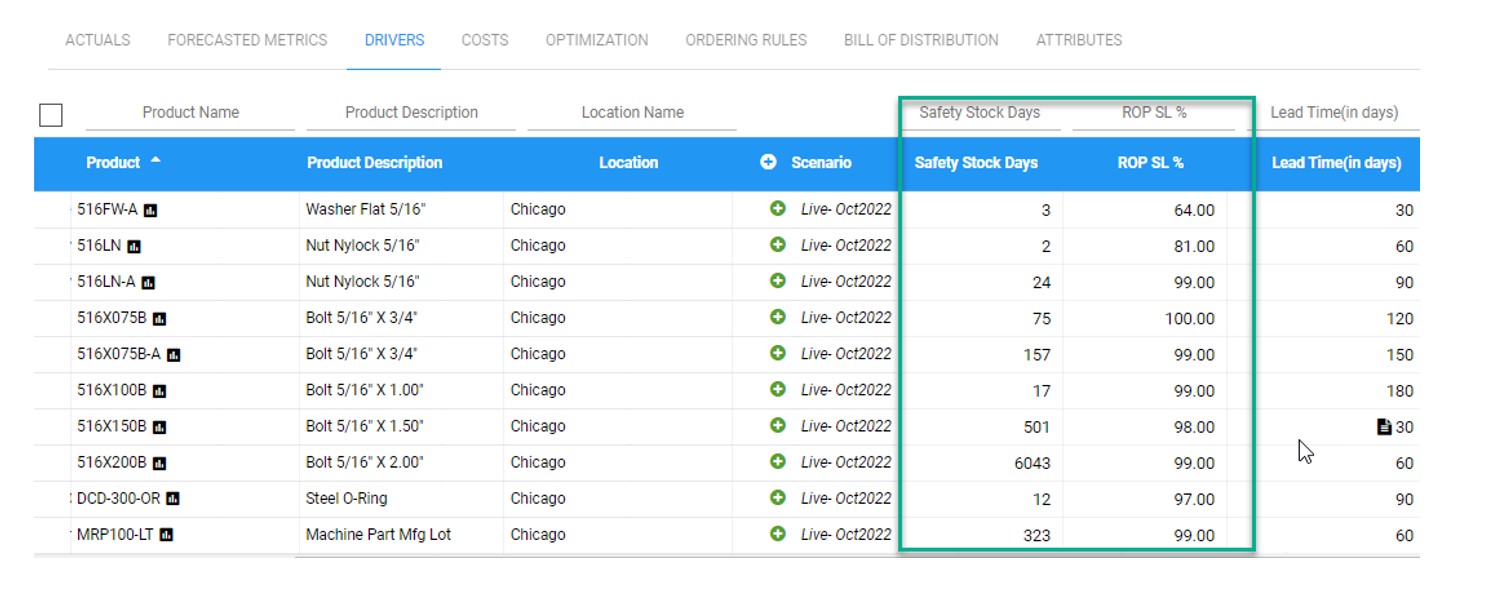
A better way to plan the right amount of safety stock is to leverage probability models that identify exactly how much stock is needed given the risk of stock-out you are willing to accept.   Below is a screenshot of Smart Inventory Optimization that does exactly that.  First, it details the predicted service levels (probability of not stocking out) associated with the current days of supply logic.  The planner can now see the parts where predicted service level is too low or too costly.  They can then make immediate corrections by targeting the desired service levels and level of inventory investment. Without this information, a planner isn’t going to know whether the targeted days of safety stock is too much, too little, or just right resulting in overstocks and shortages that cost market share and revenue. 

Computing Safety Stocks 2