Using Key Performance Predictions to Plan Stocking Policies

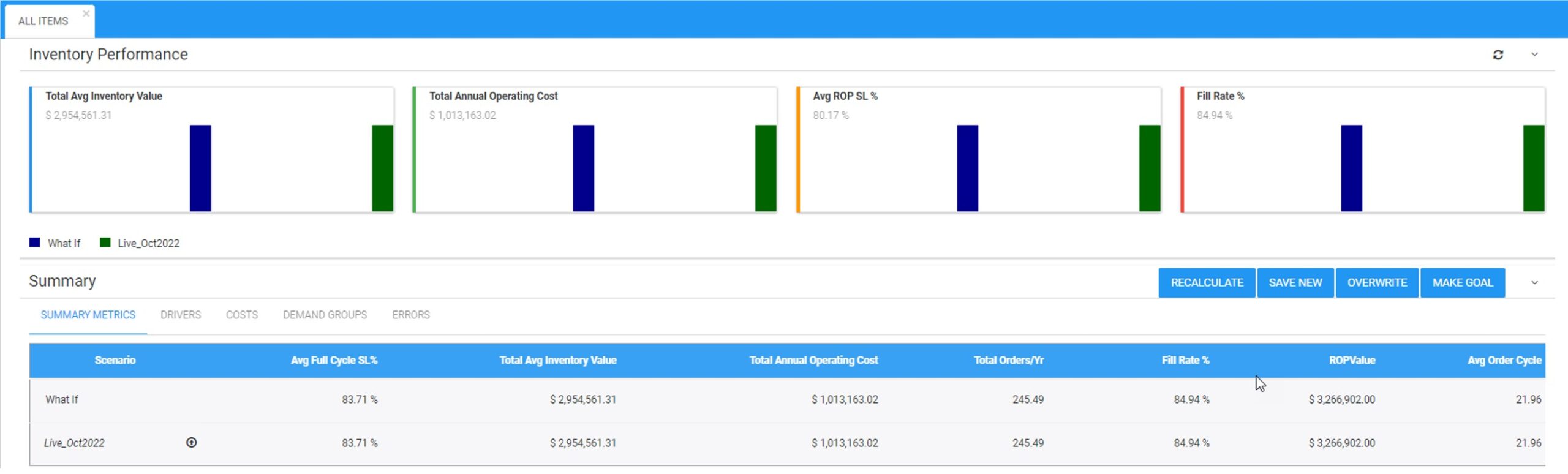
I can’t imagine being an inventory planner in spare parts, distribution, or manufacturing and having to create safety stock levels, reorder points, and order suggestions without using key performance predictions of service levels, fill rates, and inventory costs:

Using Key Performance Predictions to Plan Stocking Policies Iventory

Smart’s Inventory Optimization solution generates out-of-the-box key performance predictions that dynamically simulate how your current stocking policies will perform against possible future demands.  It reports on how often you’ll stock out, the size of the stockouts, the value of your inventory, holding costs, and more.  It lets you proactively identify problems before they occur so you can take corrective action in the short term. You can create what-if scenarios by setting targeted service levels and modifying lead times so you an see the predicted impact of these changes before committing to it.

For example,

  • You can see if a proposed move from the current service level of 90% to a targeted service level of 97% is financially advantageous
  • You can automatically identify if a different service level target is even more profitable to your business that the proposed target.
  • You can see exactly how much you’ll need to increase your reorder points to accommodate a longer lead time.


If you aren’t equipping planners with the right tools, they’ll be forced to set stocking policies, safety stock levels, and create demand forecasts in Excel or with outdated ERP functionality.   Not knowing how policies are predicted to perform will leave your company ill equipped to properly allocate inventory.  Contact us today to learn how we can help!


What is Inventory Planning? A Brief Dictionary of Inventory-Related Terms

Inventory Control concerns the management of physical goods, focusing on an accurate and up-to-the-minute count of every item in inventory and where it is located, as well as efficient retrieval of items. Relevant technologies include computer databases, barcoding, Radio Frequency Identification (RFID), and the use of robots for retrieval.

Inventory Management aims to execute the inventory policy defined by the company. Inventory Management is often accomplished using Enterprise Resource Planning (ERP) systems, which generate purchase orders, production orders, and reporting that details current inventory on hand, incoming, and up for order.

Inventory Planning sets operational policy details, such as item-specific reorder points and order quantities, and predicts future demand and supplier lead times. Important components of an inventory planning process include what-if scenarios for netting out on-hand inventory, analyzing how changes to demand, lead times, and stocking policies will impact ordering, as well as managing exceptions and contingencies.

Inventory Optimization utilizes an analytical process that computes values for inventory planning parameters (e.g., reorder points and order quantities) that optimize a numerical goal or “objective function” without violating a numerical constraint. For instance, an objective function might be to achieve the lowest possible inventory operating cost (defined as the sum of inventory holding costs, ordering costs, and shortage costs), and the constraint might be to achieve a fill rate of at least 90%. Using a mathematical model of the inventory system and probability forecasts of item demand, inventory optimization can quickly and automatically suggest how to best manage thousands of inventory items.

Explaining What “Service Level” Means in Your Inventory Optimization Software

Customers often ask us why a stocking recommendation is “so high.” Here is a question we received recently:

During our last team meeting, we found a few items with abnormal gaps between our current ROP and the Smart-suggested ROP at a 99% service level. The concern is that the system indicates that the reorder point will have to increase substantially to achieve a 99% service level. Would you please help us understand the calculation?

When we reviewed the data, it was clear to the customer that the Smart-calculated ROP was indeed correct.  We concluded (1) what they really wanted was a much lower service level target and (2) we had not done a good explaining what was really meant by “service level.” 

So, what does a “99% service level” really mean? 

When it pertains to the target that you enter in your inventory optimization software, it means that the stocking level for the item in question will have a 99% chance of being able to fill whatever the customer needs right away.  For instance, if you have 50 units in stock, there is a 99% chance that the next demand will fall somewhere in the range of 0 to 50 units.

What our customer meant was that 99% of the time a customer placed an order, it was delivered in full within whatever lead time the customer was quoted.  In other words, not necessarily right away but when promised.  

Obviously, the more time you give yourself to deliver to a customer the higher your service level will be. But that distinction is often not explicitly understood when new users of inventory optimization software are conducting what-if scenarios at different service levels.  And that can lead to considerable confusion.  Computing service levels based on immediate stock availability is a higher standard: harder to meet but much more competitive.

Our manufacturing customers often quote service levels based on lead times to their customers, so it isn’t essential for them to deliver immediately from the shelf. In contrast, our customers in the distribution, Maintenance Repair and Operations (MRO), and spare parts spaces, must normally ship same day or within 24 hours.  For them it is a competitive necessity to ship right away and do so in full.

When inputting target service levels using your inventory optimization software, keep this distinction in mind.  Choose the service level based on the percentage of the time you want to ship inventory in full, right away from the shelf.  

Don’t blame shortages on problematic lead times.

Lead time delays and supply variability are supply chain facts of life, yet inventory-carrying organizations are often caught by surprise when a supplier is late. An effective inventory planning process embraces this fact of life and develops policies that effectively account for this uncertainty. Sure, there will be times when lead time delays come out of nowhere and cause a shortage. But most often, the shortages result from:

  1. Not computing stocking policies (e.g., reorder points, safety stocks, and Min/Max levels) often enough to catch changes in the lead time. 
  2. Using poor estimates of actual lead time such as using only averages of historical receipts or relying on a supplier quote.

Instead, recalibrate policies across every single part during every planning cycle to catch changes in demand and lead times.  Rather than assuming only an average lead time, simulate the lead times using scenarios.  This way, recommended stocking policies account for the probabilities of lead times being high and adjust accordingly.  When you do this, you’ll identify needed inventory increases before it is too late. You’ll capture more sales and drive significant improvements in customer satisfaction.

How does your ERP system treat safety stock?

Is safety stock regarded as emergency spares or as a day-to-day buffer against spikes in demand? Knowing the difference and configuring your ERP properly will make a big difference to your bottom line.

The Safety Stock field in your ERP system can mean very different things depending on the configuration. Not understanding these differences and how they impact your bottom line is a common issue we’ve seen arise in implementations of our software.

Implementing inventory optimization software starts with new customers completing the technical implementation to get data flowing.  They then receive user training and spend weeks carefully configuring their initial safety stocks, reorder levels, and consensus demand forecasts with Smart IP&O.  The team becomes comfortable with Smart’s key performance predictions (KPPs) for service levels, ordering costs, and inventory on hand, all of which are forecasted using the new stocking policies.

But when they save the policies and forecasts to their ERP test system, sometimes the orders being suggested are far larger and more frequent than they expected, driving up projected inventory costs.

When this happens, the primary culprit is how the ERP is configured to treat safety stock.  Being aware of these configuration settings will help planning teams better set expectations and achieve the expected outcomes with less effort (and cause for alarm!).

Here are the three common examples of ERP safety stock configurations:

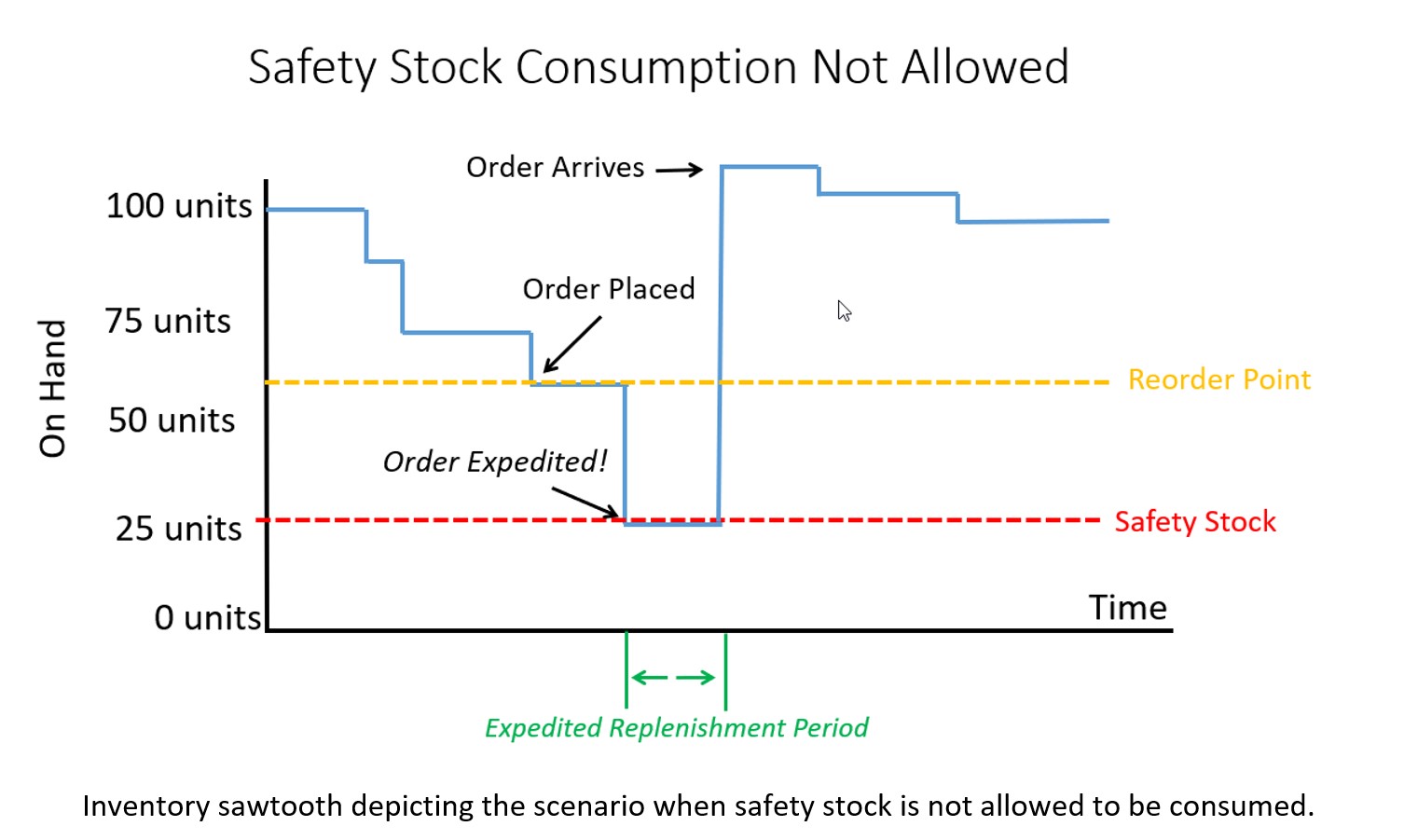
Configuration 1. Safety Stock is treated as emergency stock that can’t be consumed. If a breach of safety stock is predicted, the ERP system will force an expedite no matter the cost so the inventory on hand never falls below safety stock, even if a scheduled receipt is already on order and scheduled to arrive soon.

Configuration 2. Safety Stock is treated as Buffer stock that is designed to be consumed. The ERP system will place an order when a breach of safety stock is predicted but on hand inventory will be allowed to fall below the safety stock. The buffer stock protects against stockout during the resupply period (i.e., the lead time).

Configuration 3. Safety Stock is ignored by the system and treated as a visual planning aid or rule of thumb. It is ignored by supply planning calculations but used by the planner to help make manual assessments of when to order.

Note: We never recommend using the safety stock field as described in Configuration 3. In most cases, these configurations were not intended but result from years of improvisation that have led to using the ERP in a non-standard way.  Generally, these fields were designed to programmatically influence the replenishment calculations.  So, the focus of our conversation will be on Configurations 1 and 2. 

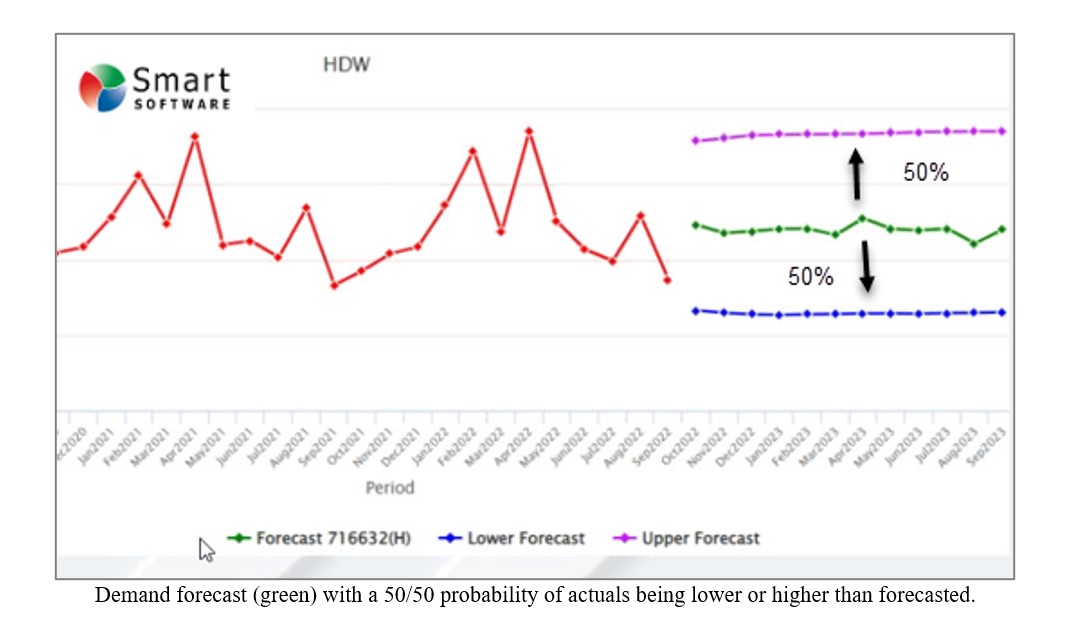
Forecasting and inventory optimization systems are designed to compute forecasts that will anticipate inventory draw down and then calculate safety stocks sufficient to protect against variability in demand and supply. This means that the safety stock is intended to be used as a protective buffer (Configuration 2) and not as emergency sparse (Configuration 3).  It is also important to understand that, by design, the safety stock will be consumed approximately 50% of the time.

Why 50%? Because actual orders will exceed an unbiased forecast half of the time. See the graphic below illustrating this.  A “good” forecast should yield the value that will come closest to the actual most often so actual demand will either be higher or lower without bias in either direction.
 

How does your ERP system treat safety stock 1


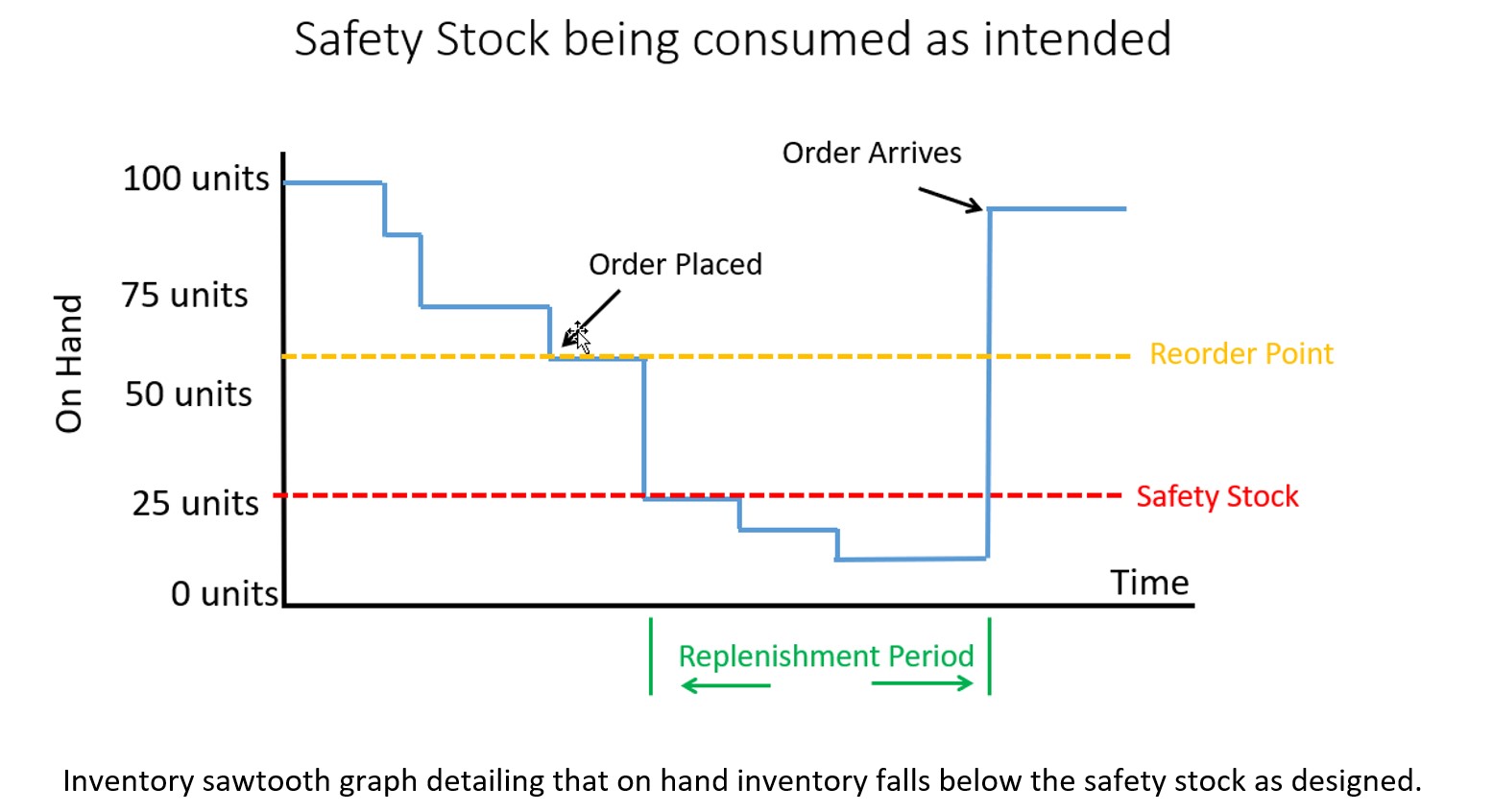
If you configured your ERP system to properly allow consumption of safety stock, then the on hand inventory might look like the graph below.  Note that some safety stock is consumed but avoided a stockout.  The service level you target when computing safety stock will dictate how often you stockout before the replenishment order arrives.  Average inventory is roughly 60 units over the time horizon in this scenario.
 

How does your ERP system treat safety stock 2


If your ERP system is configured to not allow consumption of safety stock and treats the quantity entered in the safety stock field more like emergency spares, then you will have a massive overstock!  Your inventory on hand would look like the graph below with orders being expedited as soon as a breach of safety stock is expected. Average inventory is roughly 90 units, a 50% increase compared to when you allowed safety stock to be consumed.
 

How does your ERP system treat safety stock 3